Two lists that must agree
Build a playlist that keeps song titles in one list and artists in another, with each song's details at the same place in both lists. Adding and removing must change both lists together. Removing from just one shows why: every song after it gets the wrong artist.
A music app knows who sang every song. Underneath, something has to keep each title and its artist together.
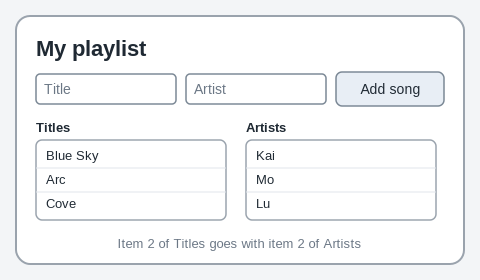
Today's playlist keeps its songs in two lists: one for titles and one for artists. A song's title and its artist sit at the same place in each list: item 1 of Titles goes with item 1 of Artists, item 2 with item 2, and so on. The place number is the only thing linking them.
How this lesson works: See it, Build, Check, Make it yours
- See it: Try the finished thing first, so you know what you are building.
- Build: Watch the short clip, then do the steps. Your app carries on from the step before.
- Check: A quick check that the idea has stuck.
- Make it yours: Change your app on purpose, then try it on someone.
Make your prediction first. Help opens once you've locked it in.
Try the finished app
This is the app you'll build, open on the Run tab. Add a song, then click a title to remove that song. On the left, beside Titles and Artists, you can see how many items each list has now.
Build 1: add to both lists
The lists Titles and Artists are made for you (left side, under Lists), and each List object on the screen shows one of them.
- On the Events tab, add an event: AddButton is clicked.
- Add the action Lists, Add … to the end of list: value
TitleInput.text, list Titles. - Add a second action to the same event:
ArtistInput.textto the end of Artists. - Run it and add a song. Is the new title level with its artist?
When AddButton is clicked, the title goes on the end of Titles and the artist on the end of Artists.
Run your program. This ticks when your code does all of the above.
Build 2: remove from both lists
- Add an event: TitleList, An item in TitleList is clicked. Inside it, ClickedIndex is the place of the title that was clicked: 1 for the first, 2 for the second.
- Add the action Lists, Remove item … from list: index
ClickedIndex, list Titles. - Add the same action for Artists.
- Run it and remove the middle song. Check every title still sits next to its own artist.
When a title is clicked, item ClickedIndex is removed from Titles and from Artists.
Run your program. This ticks when your code does all of the above.
Check: when the lists disagree
After Nib removes a song, the artists are wrong for every song below it. Click the line where Nib first goes wrong.
Make it yours: a third list
This screen now has a Minutes box and a third List object, LengthList.
- Add a list called Lengths (left side, under Lists), and set LengthList to show it (click it, then Shows in Properties).
- In the AddButton event, add
int(LengthInput.text)to the end of Lengths.int(...)turns the typed text into a number. - In the title-clicked event, remove item
ClickedIndexfrom Lengths too.
Imagine a button that sorts Titles from A to Z. Write one sentence: what would happen to the artists and lengths? Keep it for the next lesson, which keeps each song's details together in one place.
A list Lengths, shown by LengthList; Add puts the minutes on the end of it, and clicking a title removes that place from it too.
Run your program. This ticks when your code does all of the above.
Lesson done. You've finished every step you need.
- Keep two lists in step by changing both in the same event.
- Explain why a title and its artist must be at the same place in each list.
- Predict what goes wrong when only one list changes.
For teachers
Students build a playlist kept in two parallel lists, Titles and Artists, where a song's title and artist sit at the same place in each. Add puts a value on the end of both lists; clicking a title removes ClickedIndex from both. The Check shows what happens when only one list changes: every later song gets the wrong artist. This is the problem the next lesson's table solves. About 50 minutes.
Open the teacher guide: answers, solutions, slides and a worksheet.
Students will be able to
- I can keep two lists in step by changing both in the same event.
- I can explain why a title and its artist must be at the same place in each list.
- I can predict what goes wrong when only one list changes.
Before class
This lesson uses only what App Builder apps taught (lists, List objects, ClickedIndex), at Level 3. Its point is the problem, not the solution: keep the lesson short and let the third list in Make it yours feel clumsy.
Songs and artists are made up. Students can use their own made-up songs; keep real song lyrics out.
Lists count from 1 in App Builder (ClickedIndex, item(list, 1)). Python counts from 0; that's for later.
Running the lesson
- Before Build 2 (whole class, on the deck): if we remove Arc from Titles only, who sang Cove? Vote, then try it.
- Check: draw the two lists as columns on the board, cross out one item in one column, and draw the arrows that are now wrong.
- Make it yours: ask what a Sort button would need to do with three lists.
The hard part (on purpose)
The bug is invisible until the second list is looked at: each list is fine on its own. Have students read the two lists side by side, row by row, after every removal.
When students get stuck
- Nothing is added. Ask: Which event runs when Add song is clicked, and does it name both lists? Fix: Check the event's condition is AddButton is clicked, with two Add to the end of list actions.
- Clicking a title does nothing. Ask: Which List's items does the event listen to? Fix: Use An item in TitleList is clicked, and Remove item ClickedIndex (not 1) from each list.
- The lists are different lengths. Ask: Is there an event that changes only one list? Fix: Every add and every remove must change both lists. Press Start again to get the starting lists back.
Stretch and support
Stretch: Add a Sort A to Z button. With only the list actions, how close can you get, and what goes wrong? (A table, next lesson, sorts whole rows.)
Support: Build 1 together as a class; pairs do Build 2.
Where it leads
Next: One table instead, where each song is one row and can't be split up.
What each step is for
- Try the finished app: Using the finished app first shows the two lists moving together before the build, so the later slip (changing one list) has something to break.
- Build 1: add to both lists: Adding to both lists in one event is how the two stay in step: the new title and artist both land at the end, at the same place.
- Build 2: remove from both lists: Removing the same place from both lists keeps every pair together; ClickedIndex is the place of the clicked title.
- Check: when the lists disagree: Predicting what goes wrong when only one list changes, then finding Nib's slip, shows that the place number is the only link between the two lists.
- Make it yours: a third list: Adding a third list makes the cost of keeping parallel lists in step visible: every change now has to touch three places.