Two tables that link
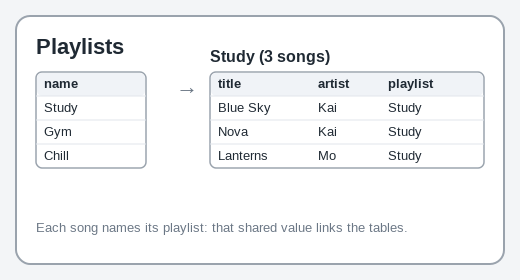
Keep playlists and songs in two tables joined by a shared value: each song names the playlist it belongs to. Clicking a playlist shows its songs, found with the same For each and condition as a filter. This is how databases keep data: flat tables, linked by a value they share.
A music app has playlists, and every playlist has songs. Behind the screen, the playlists and the songs are usually kept in two separate tables.
Some apps need two kinds of record: playlists and songs. Instead of putting a list of songs inside each playlist, keep two flat tables and link them:
- Playlists has one row per playlist: its name.
- Songs has one row per song, and a field playlist that names the playlist it belongs to. In the tables on the left it says → Playlists: it's a linked field, so you choose its value from a dropdown of playlist names.
To show a playlist, go through Songs and keep the rows whose playlist matches. That's a filter, which you already know. Databases work the same way, and the SQL course shows how they search linked tables.
How this lesson works: See it, Build, Check, Make it yours
- See it: Try the finished thing first, so you know what you are building.
- Build: Watch the short clip, then do the steps. Your app carries on from the step before.
- Check: A quick check that the idea has stuck.
- Make it yours: Change your app on purpose, then try it on someone.
Make your prediction first. Help opens once you've locked it in.
Try the finished app
This is the app you'll build, open on the Run tab. Click each playlist. On the left, open the { } JSON view of Songs: two flat lists of records, linked only by the playlist's name. In the Songs table, click a playlist cell: it's a dropdown of the names in Playlists.
Build 1: show a playlist's songs
- Add an event: An item in PlaylistTable is clicked → Set variable Chosen to
ClickedItem.name, then Clear table Shown. - Give it a sub-event: For each row in table Songs, and Compare
LoopItem.playlist=Chosen. - Its action: Add a row to table Shown, with each field from
LoopItem. - Run it and click each playlist.
Clicking a playlist sets Chosen to its name, clears Shown, and copies every song whose playlist is Chosen into Shown.
Run your program. This ticks when your code does all of the above.
Build 2: a heading with a count
Add a sub-event with no condition, below the loop: Set Heading text to Chosen & " (" & count(Shown) & " songs)"
After the loop, Heading shows the playlist's name and how many songs it has.
Run your program. This ticks when your code does all of the above.
Check: what links them?
Look at it nested
On the left, open { } JSON under Playlists, and choose Songs grouped by playlist. Now each playlist has its songs inside it, the way an app often sends data to another app.
You can't edit this view: App Builder builds it from the two flat tables each time. The app keeps the tables flat because then each song is stored once, in one place. Change a song's artist and every view of it changes too.
Make it yours: add to a playlist
There are boxes for a title and an artist, and an Add to playlist button. Make it add a row to Songs, with Chosen as the playlist. Then click the playlist again: is the new song there?
Add a song to one playlist, click another playlist, then click back. Is the song still in the right one?
Add to playlist adds a song to Songs, with Chosen as its playlist.
Run your program. This ticks when your code does all of the above.
Lesson done. You've finished every step you need.
- Keep two kinds of record in two tables linked by a shared value.
- Show the records of one table that belong to a chosen record of another.
- Explain why changing the shared value in one table breaks the link.
For teachers
Optional extension: students keep playlists and songs in two flat tables linked by a shared value (each song's playlist field names its playlist). Clicking a playlist sets Chosen and copies the songs whose playlist = Chosen into a Shown table: a join, built with the filter pattern from lesson 5. The Check shows the link breaking when a name changes in one table only. Make it yours: add a song to the open playlist. About 45 minutes.
Open the teacher guide: answers, solutions, slides and a worksheet.
Students will be able to
- I can keep two kinds of record in two tables linked by a shared value.
- I can show the records of one table that belong to a chosen record of another.
- I can explain why changing the shared value in one table breaks the link.
Before class
This is how relational databases keep data: flat tables, linked by a shared value, rather than tables inside tables. Real databases link by an id number that never changes; here the name does the job, which the Check shows is fragile.
The JSON view (the { } JSON button under each table) shows both tables as flat lists of records. Students who go on to Python or web will meet nested JSON, and building it from flat tables is a good exercise there.
The SQL course (code/sql) is the natural next step.
Running the lesson
- Before Build 1 (whole class): how would you store playlists and their songs? Collect ideas; then show the two tables.
- Check: rename a playlist live on the projector and click it.
The hard part (on purpose)
Seeing that the link is just a value: open the JSON view of both tables side by side and point to the matching names.
When students get stuck
- No songs show. Ask: What does each song's playlist field say, exactly? Fix: The comparison is exact: Study and study are different. Check spelling and capitals in both tables.
- Songs from the last playlist stay. Ask: Where is Shown cleared? Fix: Clear table Shown on the parent event, before the loop.
Stretch and support
Stretch: Add a Delete playlist button that also removes its songs. Why does that need a loop over Songs too?
Support: Build 1 together; pairs do the heading and Make it yours.
Where it leads
Next: the SQL course, where linked tables are searched with JOIN.
What each step is for
- Try the finished app: Clicking each playlist first shows the join working before it's built: the songs come from one table, chosen by a value from the other.
- Build 1: show a playlist's songs: Remembering the clicked name, then copying the songs whose playlist field matches it, joins the two tables with the filter pattern.
- Build 2: a heading with a count: Counting the copied rows after the loop reuses count() on the result, so the heading always matches what's shown.
- Check: what links them?: Renaming a playlist in one table only breaks the link, which shows the shared value is the only thing joining them.
- Look at it nested: Seeing the same data nested, built from the flat tables, shows that nesting is a way to send or show data, while flat tables are the way to keep it.
- Make it yours: add to a playlist: Adding a song with Chosen in its playlist field writes the link, so the new song appears in the playlist that's open.