Saving between visits
Make the playlist remember its songs when the app is closed and opened again: tick Remember between visits on the Songs table, test a return visit and a first visit, and greet the user differently on each. The songs are kept in this browser only.
Close a notes app and open it tomorrow: your notes are still there. An app that forgets everything when it closes isn't much use for keeping a list.
So far, every time the app starts, the table goes back to the rows you typed in the sidebar. Today the playlist will remember what was added, so a song added today is still there tomorrow.
- Remember between visits keeps a variable, list or table in this browser: on this computer, for this user, until it's forgotten.
- The project file you Save still holds the starting rows. What the app remembers is kept separately, in the browser.
- An app has a first visit (nothing saved yet) and return visits (something saved). A good app handles both.
How this lesson works: See it, Build, Check, Make it yours
- See it: Try the finished thing first, so you know what you are building.
- Build: Watch the short clip, then do the steps. Your app carries on from the step before.
- Check: A quick check that the idea has stuck.
- Make it yours: Change your app on purpose, then try it on someone.
Make your prediction first. Help opens once you've locked it in.
Try the finished app
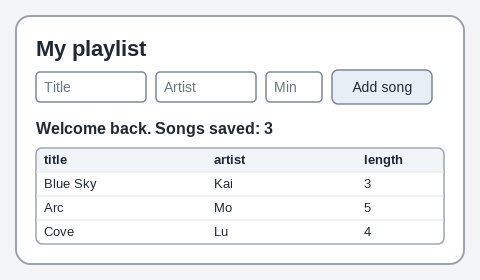
This is the app you'll build, open on the Run tab. Add a song, then press ↻ Restart: the app starts again, and your song is still there. Now press Forget saved data: it's like opening the app for the first time.
Build 1: remember the songs
- On the left, under Tables, find Songs and click its 💾 button. It lights up: Songs is now remembered.
- Open the Run tab. Add two songs.
- Press ↻ Restart. Are your songs still there?
- Press Forget saved data. The table goes back to its one starting song.
The Songs table is remembered between visits.
Run your program. This ticks when your code does all of the above.
Build 2: first visit or return visit?
- Add an event: Screen, On start of screen. Leave it with no actions.
- Give it a sub-event with the condition Compare
count(Songs)=0, and the action Set WelcomeText text to"Add your first song". - Add an Else below the sub-event (its ⋯ menu), with Set WelcomeText text to
"Welcome back. Songs saved: " & count(Songs). - Test both visits: Restart with songs saved, then remove every song and Restart again.
When the screen starts: with no songs, WelcomeText says to add the first one; otherwise it welcomes the user back with the number of songs.
Run your program. This ticks when your code does all of the above.
Check: where is it kept?
Make it yours: remember the last song
There's a variable LastAdded.
- Click its 💾 so it's remembered too.
- In the AddButton event, add Set variable LastAdded to
TitleInput.text. - Add it to the welcome back message, such as
& ". Last added: " & LastAdded.
Anyone who uses this browser next will see what the app remembered. Write down one thing a user should know about that, and where in your app you'd tell them.
A remembered variable LastAdded is set to the new title when a song is added, and the welcome back message shows it.
Run your program. This ticks when your code does all of the above.
Lesson done. You've finished every step you need.
- Make an app remember a table or variable between visits, and test it.
- Make an app behave differently on a first visit and a return visit.
- Explain where remembered data is kept, and what that means on a shared computer.
For teachers
Students make the playlist remember its songs between visits with App Builder's Remember toggle (💾) on the Songs table, test return visits with Restart and first visits with Forget saved data, and greet the user differently on each with count(Songs) in an On start of screen event with Else. The Check separates what the browser keeps from the project file and from other computers. About 45 minutes.
Open the teacher guide: answers, solutions, slides and a worksheet.
Students will be able to
- I can make an app remember a table or variable between visits, and test it.
- I can make an app behave differently on a first visit and a return visit.
- I can explain where remembered data is kept, and what that means on a shared computer.
Before class
Remember between visits keeps values in the browser's local storage, under this lesson step's own key: on this computer, for this browser user. Nothing is sent anywhere, and nothing goes into the project file (Save keeps the starting rows).
On shared computers, the next person in the same browser sees what was remembered. Keep data made up, and talk about it: it's a real design question for any app.
Running the lesson
- Before Build 1 (whole class): which apps remember things between visits? Where do you think they keep it?
- Build 2: test both visits before moving on: Restart with songs, then Forget saved data.
- Check: the Kai question is worth a minute's discussion: who else could see a saved journal?
The hard part (on purpose)
Testing: students expect to close the page. Restart (a return visit) and Forget saved data (a first visit) test both without waiting.
When students get stuck
- Songs are gone after Restart. Ask: Is the 💾 on Songs lit? Fix: Click it so it's lit, add songs again, then Restart.
- The welcome message never changes. Ask: Is the condition on a sub-event of On start of screen, with the Else below it? Fix: On start of screen has no actions; its sub-event compares count(Songs) = 0, and the Else sits right under that sub-event.
- Forget saved data isn't there. Ask: Is anything remembered yet? Fix: It shows once a variable, list or table has its 💾 lit; switch tabs and come back to Run.
Stretch and support
Stretch: Remember how many times the app has been opened: a remembered variable that goes up by 1 on start of screen.
Support: Demonstrate a return visit and a first visit on the projector before students build.
Where it leads
Next: Search, filter and sort.
What each step is for
- Try the finished app: Seeing a song survive a restart, then disappear with Forget saved data, shows both visits before building them.
- Build 1: remember the songs: One tick makes the table persist; testing with Restart, then Forget saved data, is how to check a saving app without waiting for tomorrow.
- Build 2: first visit or return visit?: Checking count(Songs) when the screen starts lets the app tell a first visit from a return visit, using a sub-event and Else.
- Check: where is it kept?: Asking where the songs actually live, and what Save holds, separates the browser's saved data from the project file and from other computers.
- Make it yours: remember the last song: Remembering a plain variable too shows Remember works on any value, and the welcome line puts it to use on a return visit.