Search, filter and sort
Find songs in a bigger playlist: sort the table by title or by length, search the titles for some typed text, and filter the short songs. Searching and filtering both use the same algorithm: go through every row and copy the ones that match into a second table, so the original songs stay as they are.
Every app with a list has a search box and a sort button. Underneath, a search is a loop that checks every row.
The playlist has more songs now. Today you'll help a user find one:
- Sort puts the rows of a table in order, by one field: titles A to Z, or the longest first. The whole row moves, so every song keeps its details.
- Search and filter go through every row with For each, and copy the rows that match into a second table, Results. The Songs table is never changed, so nothing is lost.
That second idea is an algorithm: a set of steps that works for any table. Search is the same steps with a different test.
How this lesson works: See it, Build, Check, Make it yours
- See it: Try the finished thing first, so you know what you are building.
- Build: Watch the short clip, then do the steps. Your app carries on from the step before.
- Check: A quick check that the idea has stuck.
- Make it yours: Change your app on purpose, then try it on someone.
Make your prediction first. Help opens once you've locked it in.
Try the finished app
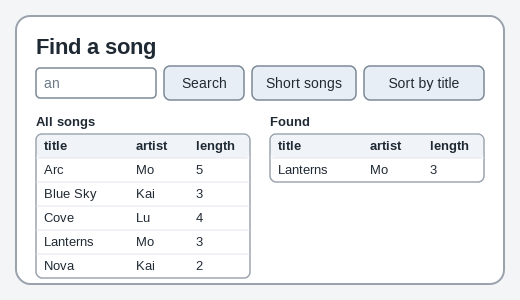
This is the app you'll build, open on the Run tab. Sort both ways, then type an and click Search, then click Short songs.
Build 1: sort
- Add an event: SortTitleButton is clicked → Tables, Sort table Songs by title, A to Z, smallest first.
- Add an event: SortLengthButton is clicked → sort Songs by length, Z to A, biggest first.
- Run it and try both. Do the artists stay with their songs?
Sort by title sorts Songs by title A to Z; Longest first sorts Songs by length, biggest first.
Run your program. This ticks when your code does all of the above.
Build 2: search
The Results table has the same fields as Songs, and ResultsTable shows it.
- Add an event: SearchButton is clicked → Clear table Results (so old results don't stay).
- Give it a sub-event: For each row in table Songs, and a second condition Compare
contains(lower(LoopItem.title), lower(SearchInput.text))=true.lower(...)makes capitals not matter. - The sub-event's action: Add a row to table Results, with title
LoopItem.title, artistLoopItem.artist, lengthLoopItem.length. - Run it. Search for an, then o. Is All songs still complete?
Search clears Results, then for each row of Songs whose title contains the typed text, adds that row to Results.
Run your program. This ticks when your code does all of the above.
Build 3: filter the short songs
Build Short songs the same way as Search. Only the test changes: Compare LoopItem.length ≤ 3.
Short songs clears Results, then adds every row of Songs with a length of 3 or less.
Run your program. This ticks when your code does all of the above.
Check: keep the songs safe
After Nib's Short songs, the long songs are gone for good. Click the line where Nib goes wrong.
Make it yours: search artists, show all
Change Search's test so it looks in the title and the artist. One way: contains(lower(LoopItem.title & " " & LoopItem.artist), lower(SearchInput.text))
There's a Show all button. Make it copy every song into Results. Which part of the pattern does it not need?
Search also finds songs whose artist contains the typed text.
Run your program. This ticks when your code does all of the above.
Show all clears Results and copies every row of Songs into it.
Run your program. This ticks when your code does all of the above.
Extra: play the clicked song
Songs now has a sound field naming one of App Builder's built-in sounds (calm, upbeat, sleepy, beat), and there's a Sound object called Music under the tables.
- Add an event: An item in SongTable is clicked.
- Action: Set Music sound to the one named
ClickedItem.sound. - Action: Play Music.
- Run it and click a few songs. Search still copies the sound field into Results, so a found song plays too if you do the same for ResultsTable.
The sounds are short tracks made for App Builder, free to use. A browser only plays sound after you've clicked something in the app, which a row click is.
Clicking a song in SongTable sets Music's sound to that row's sound field, then plays it.
Run your program. This ticks when your code does all of the above.
Lesson done. You've finished every step you need.
- Sort a table by a field, and explain why whole rows move together.
- Search or filter a table by copying the rows that match into a second table.
- Explain why a filter shouldn't remove rows from the original table.
For teachers
Students sort the Songs table by a field (titles A to Z, longest first), then build search and filter with one algorithm: clear a Results table, go through every row of Songs with For each row, and copy the rows whose test passes. The Check finds Nib removing the non-matching rows (data lost) and shows why numbers kept as text sort wrongly. Make it yours: search two fields, and Show all. About 60 minutes.
Open the teacher guide: answers, solutions, slides and a worksheet.
Students will be able to
- I can sort a table by a field, and explain why whole rows move together.
- I can search or filter a table by copying the rows that match into a second table.
- I can explain why a filter shouldn't remove rows from the original table.
Before class
Search and filter are the same algorithm (a linear search: test every row, keep the matches), with a different test. Name it as an algorithm students will meet again in Python and SQL.
Results starts empty and is cleared at the start of each search, so old results don't stay (the same idea as list-clear-before-add, the other way round).
App Builder's Sort is a tool, not an algorithm students write: it sorts numbers by size, text A to Z ignoring capitals, and keeps equal rows in their order.
Running the lesson
- Before Build 2 (whole class): find every song with 'o' in the title on a printed list. How did you do it? That's the loop.
- Check: Nib's filter is worth acting out: remove the long songs from the class list. Where did they go?
- Sort question: write 10, 9 and 3 on cards as words and sort them like a dictionary.
The hard part (on purpose)
The search condition: contains(lower(LoopItem.title), lower(SearchInput.text)) = true is long. Build it in parts in the Find expressions browser, and test with a single letter.
When students get stuck
- Search finds nothing. Ask: What does the condition compare, and with what? Fix: Compare contains(lower(LoopItem.title), lower(SearchInput.text)) = true, inside the For each row sub-event.
- Results keeps the last search's songs too. Ask: Where is Results cleared? Fix: Clear table Results as the parent event's action, before the loop.
- Sorting by length puts 10 before 9. Ask: What type is the length field? Fix: Make length a Number field (click its name in the sidebar).
Stretch and support
Stretch: Search with a minimum length too: two conditions in the same sub-event.
Support: Build Search together; pairs build Short songs by changing only the test.
Where it leads
Next: the challenge, a data app of their own.
What each step is for
- Try the finished app: Using the finished app first shows that searching fills a second table while the first stays whole, before any loop is built.
- Build 1: sort: Sort by a field moves whole rows; a number field sorts by size, which is why length was made a number.
- Build 2: search: Clearing Results, then copying every row whose title contains the search text, is the linear search: one test per row, the matches kept.
- Build 3: filter the short songs: Filtering is the same algorithm with a different test, so the build checks students can reuse the pattern rather than copy steps.
- Check: keep the songs safe: Nib's filter shows why the algorithm copies matches instead of removing the rest, and the sort question shows why a number field matters.
- Make it yours: search artists, show all: Searching two fields changes only the test, and Show all removes the test altogether, so both confirm the loop-and-copy pattern.
- Extra: play the clicked song: A field can hold the name of something to use, so the clicked row's sound field chooses which sound plays: the same ClickedItem read as before, put to a new job.