Records and fields
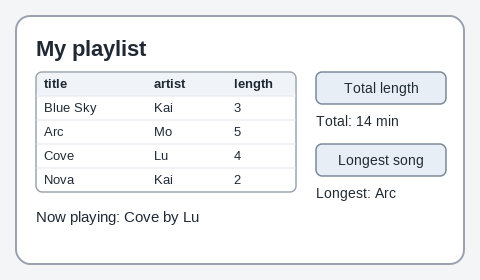
Use the songs in a table: show the clicked song as Now playing, add up every song's length with For each row, and find the longest song by keeping the best one so far. Each row is a record, and LoopItem.length or ClickedItem.title reads one field of it.
A music app tells you the playlist's total time and its longest track. Somewhere, a loop goes through every song and keeps a running total.
A table is a list of records. Today you'll read the fields of one record:
ClickedItem.titleis the title of the row that was clicked.item(Songs, 2).artistis the artist of row 2.- Inside For each row in table,
LoopItemis the row this time round, soLoopItem.lengthis that song's length.
Then you'll use two common patterns: a running total (add each song's length) and a best so far (keep the longest song seen).
How this lesson works: See it, Build, Check, Make it yours
- See it: Try the finished thing first, so you know what you are building.
- Build: Watch the short clip, then do the steps. Your app carries on from the step before.
- Check: A quick check that the idea has stuck.
- Make it yours: Change your app on purpose, then try it on someone.
Make your prediction first. Help opens once you've locked it in.
Try the finished app
This is the app you'll build, open on the Run tab. Click a song, then the two buttons. On the left, total and longest show their values now.
Build 1: now playing
- Add an event: An item in SongTable is clicked.
- Add the action NowText, Set NowText text to
"Now playing: " & ClickedItem.title & " by " & ClickedItem.artist - Run it and click a few songs.
Clicking a song sets NowText to its title and artist.
Run your program. This ticks when your code does all of the above.
Build 2: a running total
The variable total is made for you.
- Add an event: TotalButton is clicked → Set variable total to
0. - Give it a sub-event (the event's ⋯ menu, Add a sub-event). Its condition: Tables, For each row in table Songs. Its action: Add
LoopItem.lengthto variable total. - Add a second sub-event below it, with no condition and the action Set TotalText text to
"Total: " & total & " min". It runs after the loop has finished. - Run it. Check the answer by adding up the lengths yourself.
Total length sets total to 0, adds LoopItem.length for each row, then shows the total.
Run your program. This ticks when your code does all of the above.
Build 3: the longest song
A variable can hold a whole row. longest will hold the longest song found so far.
- Add an event: LongestButton is clicked → Set variable longest to
item(Songs, 1)(the first song is the best so far, to begin with). - Add a sub-event: For each row in table Songs, and a second condition Compare
LoopItem.length>longest.length. Its action: Set variable longest toLoopItem. - Add a sub-event with no condition: Set LongestText text to
"Longest: " & longest.title - Run it. Then add a song longer than all the others, and try again.
Longest song starts with row 1, swaps in any longer row inside For each row, then shows its title.
Run your program. This ticks when your code does all of the above.
Check: trace the loop
Nib's Total length always shows the last song's length. Click the line where Nib goes wrong.
Make it yours: average and shortest
count(Songs) is how many rows there are. Change TotalText's text to also show round(total / count(Songs)), such as "Total: " & total & " min, average " & round(total / count(Songs)).
There's a Shortest song button, a ShortestText and a variable shortest. Build it like the longest song. Which one thing changes?
TotalText also shows the average length: total divided by the number of songs.
Run your program. This ticks when your code does all of the above.
Shortest song finds the row with the smallest length and shows its title.
Run your program. This ticks when your code does all of the above.
Lesson done. You've finished every step you need.
- Read one field of a row with a dot, such as ClickedItem.title or LoopItem.length.
- Add up a field of every row with For each row and a running total.
- Find the row with the biggest value by keeping the best one so far.
For teachers
Students read fields of records: ClickedItem.title for a Now playing line, LoopItem.length inside For each row to total the lengths (an accumulator), and a variable holding a whole row to find the longest song (a running maximum). The Check traces the total and finds Nib resetting it inside the loop. Make it yours: the average with count(), and the shortest song. About 60 minutes.
Open the teacher guide: answers, solutions, slides and a worksheet.
Students will be able to
- I can read one field of a row with a dot, such as ClickedItem.title or LoopItem.length.
- I can add up a field of every row with For each row and a running total.
- I can find the row with the biggest value by keeping the best one so far.
Before class
These are the first named algorithms of the course: the accumulator (running total) and the running maximum (best so far). Name them as algorithm ideas, not App Builder features: they come back in Python and spreadsheets.
A variable can hold one whole row: Set variable longest to item(Songs, 1), then longest.title. While the app runs, the sidebar shows it as { title: ..., artist: ..., length: ... }.
A sub-event with no condition always runs; put it after the loop to show the result.
Running the lesson
- Before Build 2 (whole class): add up 3, 5, 4, 2 aloud, saying the running total after each. That's the loop.
- Build 3: one student reads the lengths aloud, another holds up the longest so far and swaps it when a longer one comes.
- Check: trace the total in a table on the board: row, length, total after.
The hard part (on purpose)
Where each part sits: start the total on the parent event, add inside the loop, show it in a sub-event after the loop. The order of sub-events matters, and the actions of an event run before its sub-events.
When students get stuck
- The total is only the last song's length. Ask: Where does total go back to 0? Fix: Set total to 0 on the parent event, not inside the For each row sub-event.
- TotalText shows 0. Ask: Does the sub-event that sets the text come after the loop? Fix: Put the no-condition sub-event below the For each row sub-event.
- Longest shows nothing or an error about a field. Ask: What does longest hold before the loop starts? Fix: Start it with Set variable longest to item(Songs, 1), so longest.length exists.
Stretch and support
Stretch: Show how many songs are longer than 3 minutes (a count with a condition).
Support: Build the total together, saying each step aloud; pairs do the longest song.
Where it leads
Next: Saving between visits.
What each step is for
- Try the finished app: Using the finished app first gives the targets: a clicked row's fields, a total of a column, and one row picked out of all of them.
- Build 1: now playing: ClickedItem is the whole clicked row, so a dot and a field name pick out the one detail the screen needs.
- Build 2: a running total: Starting the total at 0, adding one length per row, then showing it after the loop is the accumulator pattern; For each row makes the event run once per song.
- Build 3: the longest song: Keeping the best row so far and swapping it when a longer one comes along is the running maximum; a variable can hold one whole row.
- Check: trace the loop: Tracing total row by row, then finding Nib's reset inside the loop, check where each part of the accumulator has to sit.
- Make it yours: average and shortest: The average reuses the total with count(), and the shortest song flips one comparison in the running-maximum pattern, so both test the patterns rather than the steps.