Sensors are numbers
Read light, temperature and tilt as numbers, and show them.
A phone dims its screen in the dark and turns the picture when you tilt it. Inside, a sensor is just handing the phone a number.
- Count with a variable · Use a variable to remember a number, and change it each time a button is pressed.
The micro:bit has sensors: parts that measure the world around it, such as how bright it is or how warm. Each sensor gives the program a number. You find them in Input.
In the simulator, sensors appear as controls when your program uses them: drag the light slider (the sun), drag the temperature slider (the thermometer), or move the mouse over the micro:bit to tilt it.
How this lesson works: Predict, Run, Investigate, Modify, Make
- Predict: Read the code and say what it will do before you run anything. A wrong guess is fine: it shows you what to look for.
- Run: Run it and compare the result with your prediction.
- Investigate: Trace how each line of code connects to what you see.
- Modify: Change the code on purpose and check the result.
- Make: Build something new using what you have learned. Expect a few tries; that is normal.
Make your prediction first. Help opens once you've locked it in.
Predict

Show as code
basic.forever(function () {
basic.showNumber(input.lightLevel())
})
light level is a sensor block. It is inside forever.
Run
Drag the light slider (the sun on the simulator) up and down. Try the darkest and brightest settings.
Show as code
basic.forever(function () {
basic.showNumber(input.lightLevel())
})
Investigate
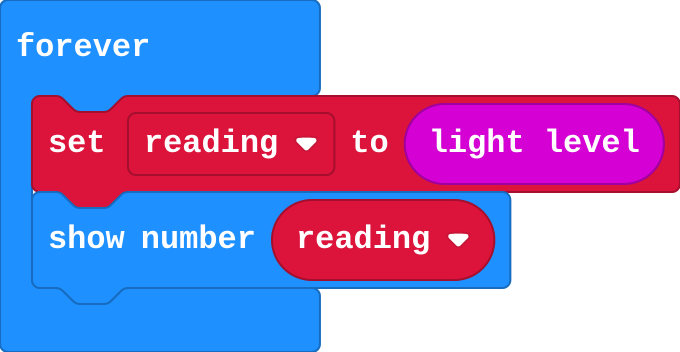
This program keeps each reading in a variable called reading, then shows it. The world changes the light; forever reads it again and again.
Show as code
let reading = 0
basic.forever(function () {
    reading = input.lightLevel()
    basic.showNumber(reading)
})
Match each sensor with its number.
Find the top of the light scale.
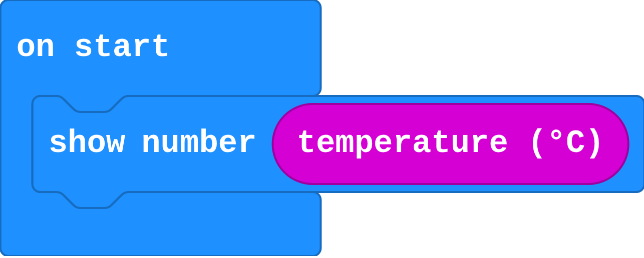
Sam's program:
Show as code
basic.showNumber(input.temperature())
Match each sensor with what its number means.
Drag the light slider all the way up. What is the biggest number the light level can be?
Modify
Show the temperature instead of the light level. Drag the temperature slider to test it.
Need a hint?
Before a hint: what kind of stuck is this? Try a strategy first
temperature is in Input. Drag it into show number, in place of light level.
Read a sensor only when asked: A shows the light level, B shows the temperature.
Need a hint?
Before a hint: what kind of stuck is this? Try a strategy first
Use on button A pressed and on button B pressed from Input.
Another hint
Put show number inside each one, with a different sensor in each.
Show the temperature instead of the light level.
This ticks by itself when your blocks do what is asked.
A shows the light level, B shows the temperature.
This ticks by itself when your blocks do what is asked.
Mix it up
A points counter, no sensors in sight.

Show as code
let points = 0
input.onButtonPressed(Button.A, function () {
    points += 2
    basic.showNumber(points)
})
input.onButtonPressed(Button.B, function () {
    points = 0
    basic.showNumber(points)
})
A changes points by 2 and B sets it to 0. Fill in points after each press.
| press | points after |
|---|---|
| (start) | 0 |
| A | |
| A | |
| B | |
| A |
Make
Make a thermometer. Again and again, it shows the temperature, then the letter C (for Celsius), then waits two seconds.
Need a hint?
Before a hint: what kind of stuck is this? Try a strategy first
Inside forever: show the temperature, then show the letter C, then pause.
Another hint
show string is in Basic. Type C into it. 2000 ms is two seconds.
A thermometer: show the temperature and a C, then wait, again and again.
This ticks by itself when your blocks do what is asked.
Change a light meter
This light meter draws a bar instead of a number: the brighter it is, the more LEDs light up. plot bar graph needs the biggest value the sensor can give (255 for light). Change it into a temperature meter, where 40 is the biggest value.
Lesson done. You've finished every step you need.
- Read a sensor and show its number.
- Say what the light, temperature and tilt numbers mean.
- Make a sensor reading update by itself.
For teachers
Students read light, temperature and tilt as numbers, and see that a sensor read in forever follows the world while one read in on start gives a single moment. About 40 minutes.
Open the teacher guide: answers, solutions, slides and a worksheet.
Students will be able to
- I can read a sensor and show its number.
- I can say what the light, temperature and tilt numbers mean.
- I can make a sensor reading update by itself.
Before class
A sensor gives the program a number that the world keeps changing. In the simulator the controls appear only once a program uses a sensor: the light slider (sun), the temperature slider (thermometer), and tilt by moving the mouse over the micro:bit. The key idea is the forever loop from lesson 2: a sensor read in forever is read again and again; in on start, once.
Running the lesson
- Predict: ask whether the number will follow the light. The key is that forever reads it again each time. Ask the 'same number over and over' group what forever does each time round.
- Run: drag the light slider from dark to bright. The number lags a little because it scrolls.
- Investigate: Sam's thermometer is lesson 2's on start mistake again, in a new place. Ask the class which lesson it reminds them of.
- Modify: Read on request shows that an event decides when a sensor is read.
- Mix it up: a quick trace of set and change from last lesson.
- Make: temperature, C, pause: three blocks in forever.
The hard part (on purpose)
A sensor is read once in on start and many times in forever. When the number never changes, ask where the sensor block is.
When students get stuck
- The number never changes. Ask: Is the sensor block in on start or in forever? Fix: Move it into forever (or a button event) so it is read again.
- The simulator has no slider. Ask: Has the program got a sensor block in it, and is it running? Fix: The slider appears only after a sensor block is used. Restart the simulator if needed.
- The temperature seems too high on a real micro:bit. Ask: Where is the sensor? Fix: It is in the processor, which warms up as it works. It reads a little above the room.
Stretch and support
Stretch: Show tilt as a number with acceleration x, then make A show tilt left and right and B show tilt forward and back (acceleration y).
Support: Give students the thermometer's forever block with show number already in it, and ask them to add the C and the pause.
Where it leads
Next unit: the micro:bit decides what to do using these numbers (if it is dark, light up). Class ideas: measure the brightest and darkest spots in the room with real micro:bits; record the temperature by a window every lesson for a week.
What each step is for
- Investigate: A sensor is a number the world keeps changing. Reading it once gives one moment; reading it in forever follows it.
- Modify: Any sensor block fits wherever a number fits, and an event decides when it is read.
- Mix it up: change adds to what is there; set throws it away.