Count with a variable
Use a variable to remember a number, and change it each time a button is pressed.
A step counter, a scoreboard, a ticket machine at the deli: each one remembers a number and changes it when something happens.
So far the micro:bit has shown pictures but forgotten everything straight away. To count, it needs to remember a number. A variable is a named place to keep a value, such as count. You find variable blocks in Variables.
How this lesson works: Predict, Run, Investigate, Modify, Make
- Predict: Read the code and say what it will do before you run anything. A wrong guess is fine: it shows you what to look for.
- Run: Run it and compare the result with your prediction.
- Investigate: Trace how each line of code connects to what you see.
- Modify: Change the code on purpose and check the result.
- Make: Build something new using what you have learned. Expect a few tries; that is normal.
Make your prediction first. Help opens once you've locked it in.
Predict

Show as code
let count = 0
basic.showNumber(count)
input.onButtonPressed(Button.A, function () {
count += 1
basic.showNumber(count)
})
set count to 0 runs once, at the start. change count by 1 runs each time A is pressed.
Run
Press A slowly three times. Wait for each number to show before you press again.
Show as code
let count = 0
basic.showNumber(count)
input.onButtonPressed(Button.A, function () {
count += 1
basic.showNumber(count)
})
Investigate
Here is a counter with a reset button.
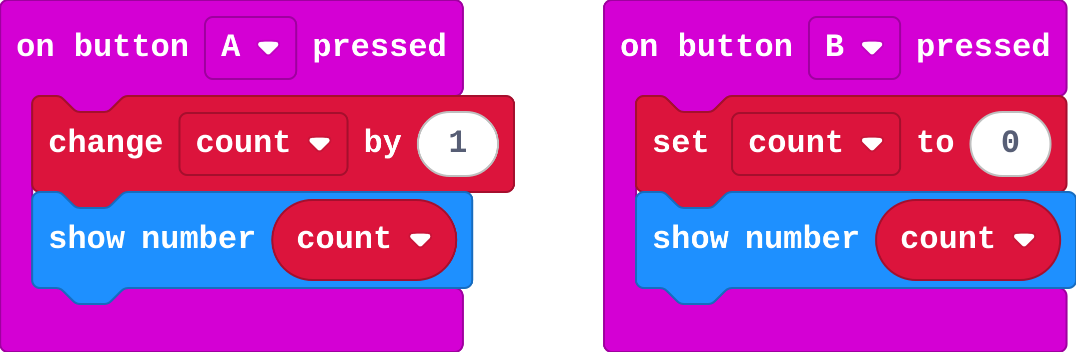
Show as code
let count = 0
input.onButtonPressed(Button.A, function () {
    count += 1
    basic.showNumber(count)
})
input.onButtonPressed(Button.B, function () {
    count = 0
    basic.showNumber(count)
})
Work out the value of count after each press.
Mia's program:

Show as code
let count = 0
input.onButtonPressed(Button.A, function () {
    count += 1
})
basic.forever(function () {
    count = 0
    basic.showNumber(count)
})
Say what each block does to the variable.
This program counts with A and resets with B. Fill in count after each press.
| press | count after |
|---|---|
| (start) | 0 |
| A | |
| A | |
| B | |
| A |
Match each block with what it does to count.
Modify
Make A count up by 2: 2, 4, 6.
Need a hint?
Before a hint: what kind of stuck is this? Try a strategy first
Click the 1 in change count by 1 and type a new number.
Add an event for B that counts down by 1 and shows the number.
Need a hint?
Before a hint: what kind of stuck is this? Try a strategy first
Drag in on button B pressed from Input.
Another hint
change count by -1 counts down. Then show number count.
Make A count up by 2.
This ticks by itself when your blocks do what is asked.
Make B count down by 1 and show the number.
This ticks by itself when your blocks do what is asked.
Mix it up
Ravi's signal board, with no variables at all.

Show as code
basic.showIcon(IconNames.Square)
basic.showIcon(IconNames.Surprised)
input.onButtonPressed(Button.A, function () {
    basic.showArrow(ArrowNames.West)
})
input.onButtonPressed(Button.B, function () {
    basic.showArrow(ArrowNames.East)
})
Make
Build a step counter. Each step shakes the micro:bit a little.
- Shake adds one step.
- A shows how many steps.
- B sets the steps back to 0.
In the simulator, click SHAKE for each step.
Need a hint?
Before a hint: what kind of stuck is this? Try a strategy first
You need three events: shake, A and B. The variable steps is already made.
Another hint
Shake changes steps by 1. A shows it. B sets it back to 0.
A step counter: shake adds a step, A shows the count, B resets it.
This ticks by itself when your blocks do what is asked.
Change a scoreboard
This scoreboard keeps two variables, one for each team. Make each goal worth 2 points, then make a shake reset both scores to 0.
Lesson done. You've finished every step you need.
- Make a variable and set its starting value.
- Change a variable when an event happens, and show it.
- Explain the difference between set and change.
For teachers
Students use a variable to count button presses and shakes, and see the difference between setting a variable and changing it. About 45 minutes.
Open the teacher guide: answers, solutions, slides and a worksheet.
Students will be able to
- I can make a variable and set its starting value.
- I can change a variable when an event happens, and show it.
- I can explain the difference between set and change.
Before class
A variable is a named box that holds a value, such as count. Make one in Variables › Make a Variable. Two blocks matter: set puts a new value in the box (throwing the old one away) and change adds to what is already there. Where the set block goes matters: in on start it runs once; in forever it runs again and again and wipes the count. Numbers above 9 scroll across the screen, so ask students to wait before pressing again.
Running the lesson
- Predict: most students say 3. Some say 1 (change sets it to 1). Ask what count is before the second press. Ask the students who chose 1 what change count by 1 does to a count that is already 1.
- Run: press slowly. Point out that the number is remembered between presses: that is the variable.
- Investigate: the trace shows set (B) throwing the value away. Mia's counter is the most common mistake this lesson: set inside forever.
- Modify: change by -1 counts down. Negative numbers show with a minus sign.
- Mix it up: a look back at events, with no variables.
- Make: three events and one variable. steps is already made for them.
The hard part (on purpose)
Telling set from change. Ask what count was before the press, and what it is after.
When students get stuck
- The number always shows 0. Ask: Where is your set count to 0 block? Fix: Move it into on start. In forever it resets the count all the time.
- The count goes up but nothing shows. Ask: Which block shows the number, and when does it run? Fix: Add show number count inside the button event, after the change block.
- Numbers above 9 seem to go missing. Ask: What happens when the screen is still scrolling? Fix: Wait for the number to finish scrolling, or press more slowly.
Stretch and support
Stretch: Make the scoreboard show both scores on A+B, one after the other.
Support: Give students the step counter's three event blocks already in place, and ask them only to fill in set, change and show.
Where it leads
Next lesson: sensors give numbers too, but the micro:bit updates them by itself. Class ideas: a class tally of votes with A and B; count the steps between classrooms with a real micro:bit in a pocket.
What each step is for
- Investigate: A variable keeps its value between events. change adds to it; set replaces it. Setting it again and again in forever wipes it out.
- Modify: change can add any amount, including a negative one, which counts down.
- Mix it up: Each event block holds the blocks for its own event, and runs only when that event happens.