If and else
Use one if … else block to choose between two things, so exactly one of them happens.
A bike light is on in the dark and off in daylight. Never both, never neither: one question decides which.
- Count with a variable · Use a variable to remember a number, and change it each time a button is pressed.
- If · Make the micro:bit decide what to do, using a sensor and an if block.
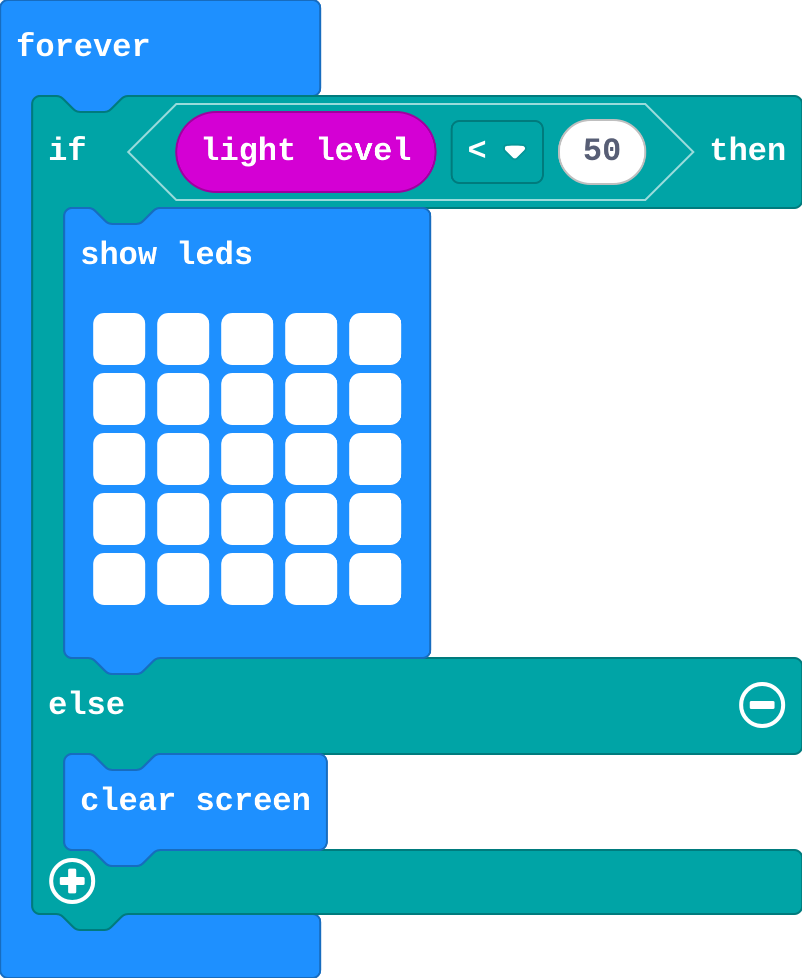
Last lesson the night light needed two if blocks: one to turn the lights on, one to turn them off. An if … else block does both: if the question is true, run the first part; else (otherwise), run the second. Click the + at the bottom of an if block to add else.
How this lesson works: Predict, Run, Investigate, Modify, Make
- Predict: Read the code and say what it will do before you run anything. A wrong guess is fine: it shows you what to look for.
- Run: Run it and compare the result with your prediction.
- Investigate: Trace how each line of code connects to what you see.
- Modify: Change the code on purpose and check the result.
- Make: Build something new using what you have learned. Expect a few tries; that is normal.
Make your prediction first. Help opens once you've locked it in.
Predict
Show as code
basic.forever(function () {
    if (input.lightLevel() < 50) {
        basic.showLeds(`
            # # # # #
            # # # # #
            # # # # #
            # # # # #
            # # # # #
            `)
    } else {
        basic.clearScreen()
    }
})
This is last lesson's night light, built with one if … else.
Run
Drag the light slider down to dark, then back up to bright. Do the lights go off now?
Show as code
basic.forever(function () {
    if (input.lightLevel() < 50) {
        basic.showLeds(`
            # # # # #
            # # # # #
            # # # # #
            # # # # #
            # # # # #
            `)
    } else {
        basic.clearScreen()
    }
})
Investigate
Show as code
basic.forever(function () {
    if (input.lightLevel() < 50) {
        basic.showLeds(`
            # # # # #
            # # # # #
            # # # # #
            # # # # #
            # # # # #
            `)
    } else {
        basic.clearScreen()
    }
})
Work out what happens at each light level. Watch the edge at 50.
For each light level, what does the night light do?
| light level | does |
|---|---|
| 20 | |
| 200 | |
| 50 | |
| 49 |
Modify
This is the two-if night light. Rebuild it with one if … else.
Need a hint?
Before a hint: what kind of stuck is this? Try a strategy first
Click the + on the first if to add else.
Another hint
Move clear screen into the else part, then delete the second if.
Make the else part show a small dot or square, so the light glows a little in the day.
Need a hint?
Before a hint: what kind of stuck is this? Try a strategy first
Swap clear screen in the else part for show icon, and choose the small square.
Rebuild the two-if night light with one if … else.
This ticks by itself when your blocks do what is asked.
In the else part, show a small dot or square instead of clearing the screen.
This ticks by itself when your blocks do what is asked.
Mix it up
A counter with a prize, from earlier lessons.

Show as code
let count = 0
input.onButtonPressed(Button.A, function () {
    count += 1
    basic.showNumber(count)
    if (count == 5) {
        basic.showIcon(IconNames.Diamond)
    }
})
Make
Make a bike light with one if … else:
- When it is dark (light level below 50): light all the LEDs.
- Else: show a small square, to save the battery.
Need a hint?
Before a hint: what kind of stuck is this? Try a strategy first
One if … else inside forever. The question is about the light level.
Another hint
If it is dark (light level < 50), light all the LEDs. Else, show a small square.
A bike light: all the LEDs on when it is dark, else a small square.
This ticks by itself when your blocks do what is asked.
Change a desk lamp
This desk lamp lights up when the room is dim. Make it switch at 120 instead, and show a moon you draw when it is on.
Lesson done. You've finished every step you need.
- Use if … else to choose between two things.
- Say when the else part runs.
- Turn two ifs into one if … else.
For teachers
Students use if … else to choose between two things, and see that exactly one part runs each time: the else runs only when the question is false. About 40 minutes.
Open the teacher guide: answers, solutions, slides and a worksheet.
Students will be able to
- I can use if … else to choose between two things.
- I can say when the else part runs.
- I can turn two ifs into one if … else.
Before class
Click the + at the bottom of an if block to add else (otherwise). If the question is true, the first part runs; if false, the else part runs. Exactly one of the two runs each time, so if … else has no gap (like two ifs that miss a value) and no overlap. else if (more questions in a row) is the next lesson.
Running the lesson
- Predict: some students think both parts run, one after the other. Ask: what does 'otherwise' mean? Ask the 'both' group to read the block aloud with 'otherwise' in place of else.
- Run: dark then bright. The lights go off now, because the else part clears them.
- Investigate: the trace pins down the edge: 50 is not less than 50. Kim's flicker is the belief that else always runs too.
- Modify: rebuilding the night light shows what else replaces: the opposite question.
- Mix it up: an if with no else, from last lesson, inside a counter.
- Make: one if … else, one question.
The hard part (on purpose)
Believing both parts run. Ask them to say the block aloud with 'otherwise' in place of else.
When students get stuck
- There is no else in the if block. Ask: Where is the + on the if block? Fix: Click the + at the bottom of the if. It adds an else part.
- The lights stay on in the day. Ask: Which part clears the screen, and when does it run? Fix: Put clear screen (or the small square) in the else part.
- Two ifs and an else, and the picture flickers. Ask: How many questions do you need for two choices? Fix: One question and an else. Delete the second if.
Stretch and support
Stretch: Make the bike light flash in the dark (show, pause, clear, pause) and glow steadily in the day.
Support: Give students the if … else already in forever with the question filled in, and ask them only to fill each part.
Where it leads
Next lesson: else if, for three or more choices, where the order of the questions matters.
What each step is for
- Investigate: else runs exactly when the question is false, so one if … else covers both cases with no gap and no overlap.
- Modify: else replaces the opposite question: one if … else does the job of two ifs.
- Mix it up: An if with no else does nothing when its question is false.