A first game in Construct
Build Spell Caster, a small top-down game, with Construct 3's own guided tour (or its written Beginner's guide), then work out what makes each part happen. A behaviour is something the engine does for an object every moment, such as moving it with the arrow keys or flying it forward. An event is a row that says when something happens and what to do then, such as spawning a spell when the mouse is clicked.
Game engines like Construct let you make a working game in an hour, because the engine does the hard, repeated work. Your job is to say what should happen, and when.
Construct 3 is a game engine that runs in your browser. People use it to make games, and also to try out ideas for apps and websites before anyone builds them for real.
In Construct you don't write code line by line. You do two things:
- You give an object a behaviour, and the engine looks after it for you every moment. The 8 Direction behaviour moves an object with the arrow keys. The Bullet behaviour flies it forward.
- You write events on an event sheet. Each event is a row: on the left, when something happens (the condition); on the right, what to do then (the actions).
Here are three of the events from the game you'll build, Spell Caster:
| When (condition) | Do (actions) |
|---|---|
| Every tick | Player: set angle toward the mouse |
| Mouse: on left button clicked | Player: spawn a Spell |
| Spell: on collision with Goblin | Goblin: subtract 1 from health · Spell: destroy |
How this lesson works: Predict, Try, Investigate, Modify, Make, Practise
- Predict: Read the problem and decide what you think before you try anything. A wrong guess is fine: it shows you what to look for.
- Try: Try it on the board and compare the result with your prediction.
- Investigate: Work out why it happens, one step at a time.
- Modify: Change the problem on purpose and see what happens.
- Make: Make your own problem using what you have learned. Expect a few tries; that is normal.
- Practise: A few on your own, to check you have it.
Make your prediction first. Help opens once you've locked it in.
Do the arrow keys work?
Build it: Spell Caster
Open Construct at editor.construct.net. It runs in the browser: nothing to install, and you don't need to sign in.
Choose one way to build the same game:
- The guided tour. When Construct opens, choose Take a guided tour. It points to each thing to click, one step at a time. Best if this is your first time.
- The Beginner's guide. The Beginner's guide to Construct 3 is the same game as a written tutorial. Good if you'd rather read, want to go back over a step, or missed a lesson.
When you're done, press Preview (the play button) and play. Shoot some goblins. Try the arrow keys.
Before you close the tab, save a copy of your project to your computer. You'll use it again later in this lesson.
Was your guess right? Nothing on the event sheet mentions the arrow keys, and the player still moves. That's the 8 Direction behaviour.
When you've finished, your event sheet should look like this. Each yellow line is a comment saying what the event below it is for. Check yours against it, top to bottom. Keep it open: you'll use it in the next steps.
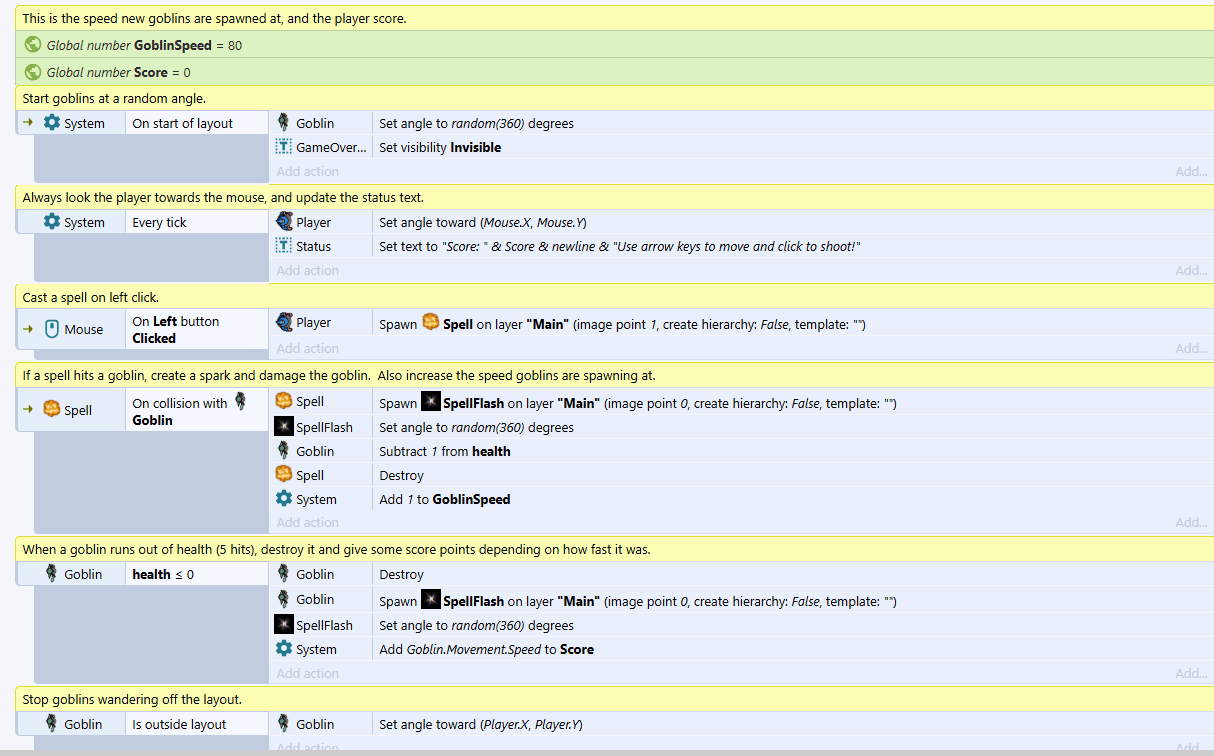
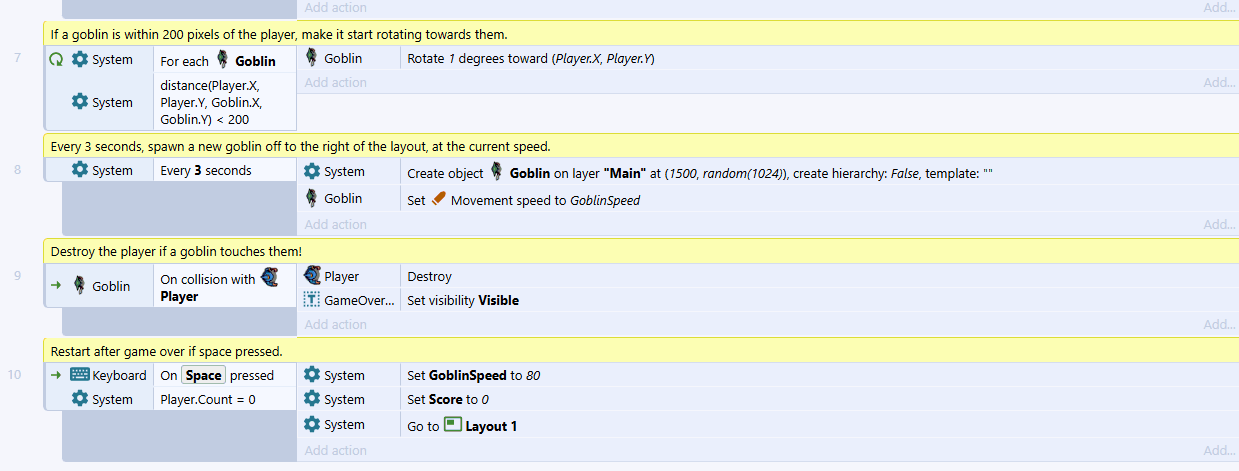
Spell Caster is the demo game from Scirra's Beginner's guide to Construct 3 (CC BY 4.0). Screenshots of the finished event sheet in Construct 3.
Behaviour or event?
What makes each of these happen in Spell Caster: a behaviour, or an event?
Nib's player drifts forward on its own. Click the line where Nib first goes wrong.
Change one thing
To change a number in an event, double-click it on the event sheet, type the new value, and press Enter. Then press Preview to play.
Stronger spells
Ideas for your own change: make the player faster (click the Player, then find the 8 Direction behaviour's speed in the Properties panel), give goblins more health, or score more points per goblin.
Wider: which goblins lose health?
Construct calls this picking. Events pick the objects their conditions are true for, and the actions only touch those.
Lesson done. You've finished every step you need.
- Build a small game in Construct by following a tutorial.
- Say whether a behaviour or an event makes something happen in a game.
- Find the event that sets a rule and change it.
For teachers
Students build Spell Caster with Construct 3's guided tour or its written Beginner's guide (the same game either way), then sort what the game does into behaviours (the engine moves the object every moment) and events (a condition, then actions). They change one event, find where damage is set, and make a change of their own. About 60 minutes.
Open the teacher guide: answers, solutions, slides and a worksheet.
Students will be able to
- I can build a small game in Construct by following a tutorial.
- I can say whether a behaviour or an event makes something happen in a game.
- I can find the event that sets a rule and change it.
Before class
Try it first on a student laptop: open editor.construct.net and choose Take a guided tour. Construct needs WebGL (graphics support in the browser). Without it the editor loads but warns that it can't open any layout views, and nothing can be built. Locked-down or old laptops are the usual cause; try another browser or an updated one.
The free edition is enough: no sign-in, no seats. Spell Caster uses 10 events, and the free edition allows 50. Students should save a copy of their project to their device before closing the tab (Construct keeps nothing for them unless they sign in), so a second lesson can carry on from it.
Two routes, one game: the guided tour, inside the editor, points at each thing to click; the Beginner's guide on construct.net is the written version. Students who were away, or who want to go back over a step, can use the guide. Construct updates itself, so a step may look slightly different from the guide's screenshots.
The one idea: a behaviour is something the engine does for an object every moment; an event says when something happens and what to do then. Picking (the wider step) is the next big idea and gets its own lesson later; here it's only a first look.
The Beginner's guide is by Scirra (Construct's makers), licensed CC BY 4.0. This lesson links to it and does not copy it.
Running the lesson
- Predict: most students say nothing happens because no event uses the keys. Leave it open until they play.
- Build it: circulate during the first event. Ask which side is when and which side is what to do.
- Investigate: for each sorted item, ask where in Construct you'd look to change it: the object's behaviours, or the event sheet.
- Modify: insist on a prediction before they change the 3. Then ask them to change it back.
- Make: ask each student to name their own change as a behaviour change or an event change.
The hard part (on purpose)
The build takes most of the lesson, and fast builders click through the tour without reading what each step is for. Stop the class once the first event is added and ask what the left side and the right side of the row each mean.
When students get stuck
- The editor says it failed to initialise WebGL. Ask: Which browser are you using? Fix: Try an up-to-date Chrome or Edge, or another laptop. If none work, pair the student with someone whose laptop does.
- A student lost their place in the guided tour. Ask: What's the last thing you added? Fix: Open the Beginner's guide and find that step. It's the same game, so they can carry on from there.
- A student thinks an event is needed for every movement. Ask: Which object moves, and what behaviours does it have? Fix: Click the object and look at Behaviors in the Properties panel. The behaviour is doing the moving.
- A student can't find where to change damage. Ask: At what moment does a goblin get hurt? Fix: When a spell hits it, so look for the event with Spell on collision with Goblin.
Stretch and support
Stretch: Make a goblin that's harder to beat (more health) and worth more points, without adding a new event. Which existing events and properties do you change?
Support: Pair students for the build: one reads the step, one clicks, swapping each event.
Where it leads
Next in Construct games (planned): Objects and layouts, then Behaviours, which is the home of the idea planted here. Students who did App Builder apps already know events, variables, sub-events and picking.
For students who did MakeCode Arcade: Arcade moves sprites with velocity blocks and a controller block, where Construct uses behaviours. Same job, different tool.
What each step is for
- do the arrow keys work?: Committing to an answer before building sets up the lesson's move: something can move with no event that mentions it, because a behaviour does the work.
- Build it: Spell Caster: Building the real game in Construct settles the prediction: students see the player move with no event for it.
- behaviour or event?: Sorting each thing the game does into behaviour or event is the move itself; the trigger question and Nib's mistake test it from two other sides.
- change one thing: Changing one event and predicting first shows that events are where the game's rules live, and that a small change has a clear effect.
- stronger spells: Finding the event and action to change, then making the change, has students use the move on their own: rules live in events, movement in behaviours.
- Wider: which goblins lose health?: A first look at picking, which is Construct's own big idea: an action applies only to the objects the condition picked.