← AI robots

AI robots: recap

For after the lessons: one card per lesson, to check what you remember. Answer each question in your head or on paper first, then check it. Nothing here is marked.

Drive with a model

1. Drive with gestures

Try firstThe model sends Left, then nothing. What does the robot do, and why?

Check your answer

It keeps turning left: the radio handler set the mode to Left, and forever keeps acting on the mode until a new label arrives.

The model sends a word; the robot remembers it as its mode.

  • on radio received string sets the mode.
  • forever acts on the mode, again and again, until a new word arrives.
  • An else that stops is a safe default for words the robot doesn't know.
The program as blocks
Show as code
radio.onReceivedString(function (receivedString) {
    mode = receivedString
})
basic.forever(function () {
    if (mode == "Forward") {
        robot.motorTank(50, 50)
    } else if (mode == "Left") {
        robot.motorTank(-30, 30)
    } else if (mode == "Right") {
        robot.motorTank(30, -30)
    } else {
        robot.motorStop()
    }
})
// Test remote: the buttons send what the model would send.
input.onButtonPressed(Button.A, function () {
    radio.sendString("Left")
})
input.onButtonPressed(Button.B, function () {
    radio.sendString("Right")
})
input.onButtonPressed(Button.AB, function () {
    radio.sendString("Forward")
})
input.onLogoEvent(TouchButtonEvent.Pressed, function () {
    radio.sendString("Stop")
})
let mode = ""
robot.elecfreaksCuteBot.start()
radio.setGroup(7)
The example, as blocks
Open the lesson →

2. A wrist remote

Try firstWhy didn't the robot's program change when the webcam model was replaced by a wrist model?

Check your answer

The robot only receives words. As long as the new model sends the same words, the robot doesn't care where they came from.

A model can run on the remote: a wrist micro:bit recognises your movement and sends a word by radio.

  • The robot's program doesn't change: it only sees words.
  • Send Stop for unknown, so an unsure model never leaves the robot driving.
  • on ML start sends once per action, so the robot keeps its last mode.
The program as blocks
Show as code
// Wrist: each action the model recognises becomes a command
ml.onStart(ml.event.Walking, function () {
    radio.sendString("Forward")
})
ml.onStart(ml.event.Waving, function () {
    radio.sendString("Left")
})
ml.onStart(ml.event.Clapping, function () {
    radio.sendString("Right")
})
ml.onStart(ml.event.Still, function () {
    radio.sendString("Stop")
})
// Robot: the same code as Drive with gestures
radio.onReceivedString(function (receivedString) {
    mode = receivedString
})
basic.forever(function () {
    if (mode == "Forward") {
        robot.motorTank(50, 50)
    } else if (mode == "Left") {
        robot.motorTank(-30, 30)
    } else if (mode == "Right") {
        robot.motorTank(30, -30)
    } else {
        robot.motorStop()
    }
})
let mode = ""
robot.elecfreaksCuteBot.start()
radio.setGroup(7)
The example, as blocks
Open the lesson →

3. When the model is unsure

Try firstWhy does a robot need both an Unsure action and a watchdog?

Check your answer

Unsure handles a model that can't decide; the watchdog handles getting no messages at all. Both make the robot stop.

A robot driven by a model needs a safe action (stop) for:

  • Unsure: the model can't decide, so the board sends Unsure.
  • Silence: a watchdog remembers when the last label arrived and stops the robot if too long passes.

The board repeats its label every second, so a working robot never trips the watchdog.

The program as blocks
Show as code
radio.onReceivedString(function (receivedString) {
    mode = receivedString
    lastHeard = input.runningTime()
})
basic.forever(function () {
    if (input.runningTime() - lastHeard > 2000) {
        mode = "Stop"
    }
    if (mode == "Forward") {
        robot.motorTank(50, 50)
    } else if (mode == "Left") {
        robot.motorTank(-30, 30)
    } else if (mode == "Right") {
        robot.motorTank(30, -30)
    } else {
        robot.motorStop()
    }
})
// Test remote: A+B sends Forward once (like a model that then goes quiet); B sends Unsure.
input.onButtonPressed(Button.AB, function () {
    radio.sendString("Forward")
})
input.onButtonPressed(Button.B, function () {
    radio.sendString("Unsure")
})
let lastHeard = 0
let mode = ""
robot.elecfreaksCuteBot.start()
radio.setGroup(7)
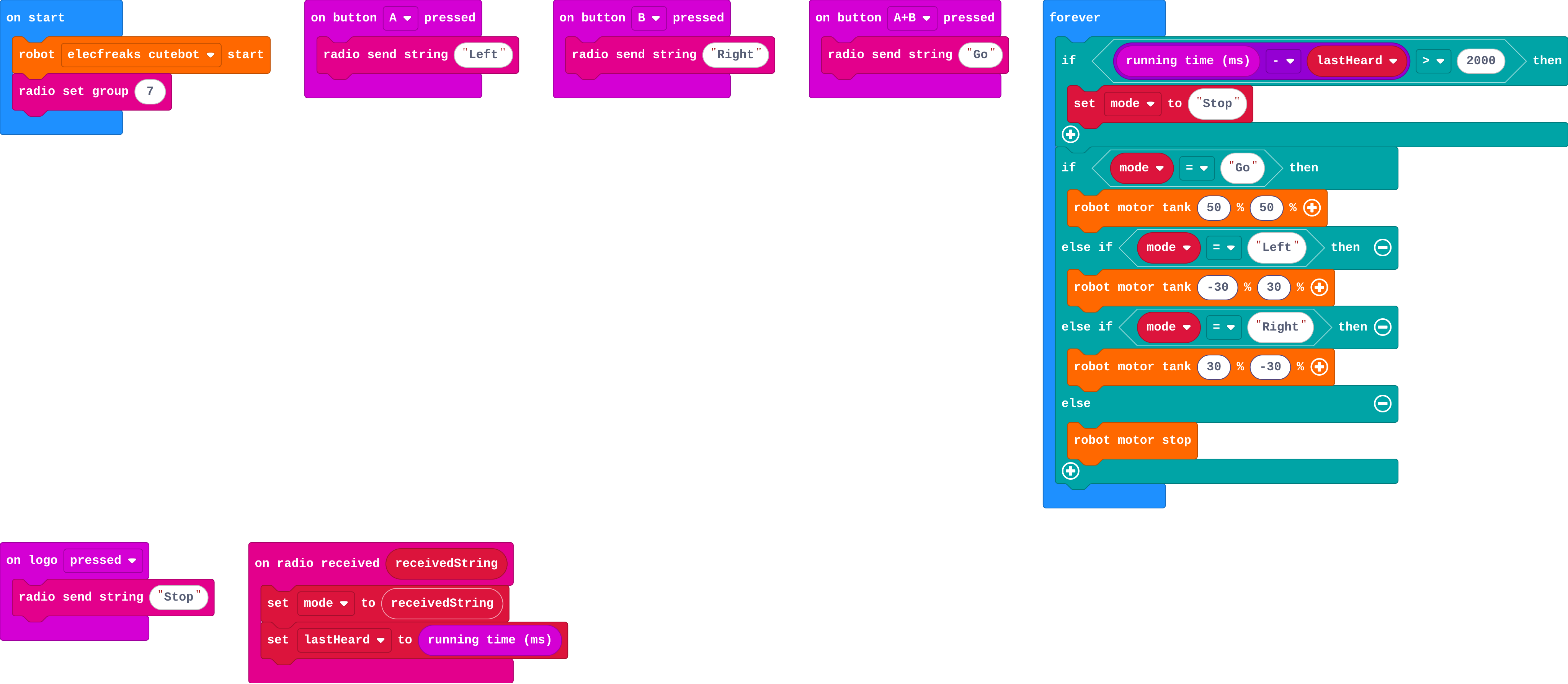
The example, as blocks
Open the lesson →

Costly mistakes

4. Signs: some mistakes cost more

Try firstWhy does Go need a higher threshold than Left?

Check your answer

Mistaking Stop for Go can cause a crash; mistaking Left for Right only wastes time. Costly actions need more confidence.

Some mistakes cost more than others.

  • The board needs 95% for Go and 70% for the rest; anything less is Unsure.
  • The robot drives only after Go twice in a row, but Stop acts at once.
  • More caution means more stops: put it where mistakes are costly.
The program as blocks
Show as code
radio.onReceivedString(function (receivedString) {
    mode = receivedString
    lastHeard = input.runningTime()
})
basic.forever(function () {
    if (input.runningTime() - lastHeard > 2000) {
        mode = "Stop"
    }
    if (mode == "Go") {
        robot.motorTank(50, 50)
    } else if (mode == "Left") {
        robot.motorTank(-30, 30)
    } else if (mode == "Right") {
        robot.motorTank(30, -30)
    } else {
        robot.motorStop()
    }
})
input.onButtonPressed(Button.A, function () {
    radio.sendString("Left")
})
input.onButtonPressed(Button.B, function () {
    radio.sendString("Right")
})
input.onButtonPressed(Button.AB, function () {
    radio.sendString("Go")
})
input.onLogoEvent(TouchButtonEvent.Pressed, function () {
    radio.sendString("Stop")
})
let lastHeard = 0
let mode = ""
robot.elecfreaksCuteBot.start()
radio.setGroup(7)
The example, as blocks
Open the lesson →

Final challenge: Delivery robot

5. Delivery robot

Try firstWhy does the distance check go before the Go branch?

Check your answer

An if, else if chain runs only the first match; the safety check must win whatever the model says, so it goes first.

The robot trusts the model for the sign and its own sensor for safety.

  • The distance check goes first in forever, so it overrules every label.
  • The robot sends its readings back by radio; the bridge passes them to the computer.
  • Send an alert once (a variable remembers it was sent).
The program as blocks
Show as code
radio.onReceivedString(function (receivedString) {
    if (receivedString == "Go") {
        goCount += 1
    } else {
        goCount = 0
    }
    mode = receivedString
    lastHeard = input.runningTime()
})
basic.forever(function () {
    if (input.runningTime() - lastHeard > 2000) {
        mode = "Stop"
    }
    if (mode == "Go" && goCount >= 2) {
        robot.motorTank(40, 40)
        robot.setColor(0x00ff00)
    } else if (mode == "Left") {
        robot.motorTank(-30, 30)
        robot.setColor(0xffff00)
    } else if (mode == "Right") {
        robot.motorTank(30, -30)
        robot.setColor(0xffff00)
    } else {
        robot.motorStop()
        robot.setColor(0xff0000)
    }
})
input.onButtonPressed(Button.A, function () {
    radio.sendString("Left")
})
input.onButtonPressed(Button.B, function () {
    radio.sendString("Right")
})
input.onButtonPressed(Button.AB, function () {
    radio.sendString("Go")
})
input.onLogoEvent(TouchButtonEvent.Pressed, function () {
    radio.sendString("Stop")
})
let goCount = 0
let lastHeard = 0
let mode = ""
robot.elecfreaksCuteBot.start()
radio.setGroup(7)
The example, as blocks
Open the lesson →