Signs: some mistakes cost more
Mistaking Stop for Go is worse than mistaking Left for Right, so the robot should need more confidence before a risky action than a safe one. The board asks 95% for Go and 70% for the rest; the robot also waits for Go twice in a row.
A self-driving car that brakes for a plastic bag is annoying. One that drives through a stop sign is dangerous. Its designers make it much more careful about some decisions than others.
- One robot, many jobs · A mode variable remembers which job the robot is doing; buttons change it, and forever does that job.
- Time between · Store the running time at one moment and take it away from a later one, to measure how long something took.
This time the model reads printed signs: print the four signs (Go, Left, Right, Stop) and train a class for each in the Pattern Trainer, holding the sign at different distances, angles and light. Download the new model and open it on the board below.
The board on this page does not treat every label the same: it sends Go only when the model is 95% sure, and the others at 70%. Anything less is Unsure.
How this lesson works: Predict, Run, Investigate, Modify, Make
- Predict: Read the code and say what it will do before you run anything. A wrong guess is fine: it shows you what to look for.
- Run: Run it and compare the result with your prediction.
- Investigate: Trace how each line of code connects to what you see.
- Modify: Change the code on purpose and check the result.
- Make: Build something new using what you have learned. Expect a few tries; that is normal.
Make your prediction first. Help opens once you've locked it in.
Predict
Run
The robot is last lesson's, with Go in place of Forward: A Left, B Right, A+B Go, logo Stop. Without new labels, the watchdog stops it after two seconds.
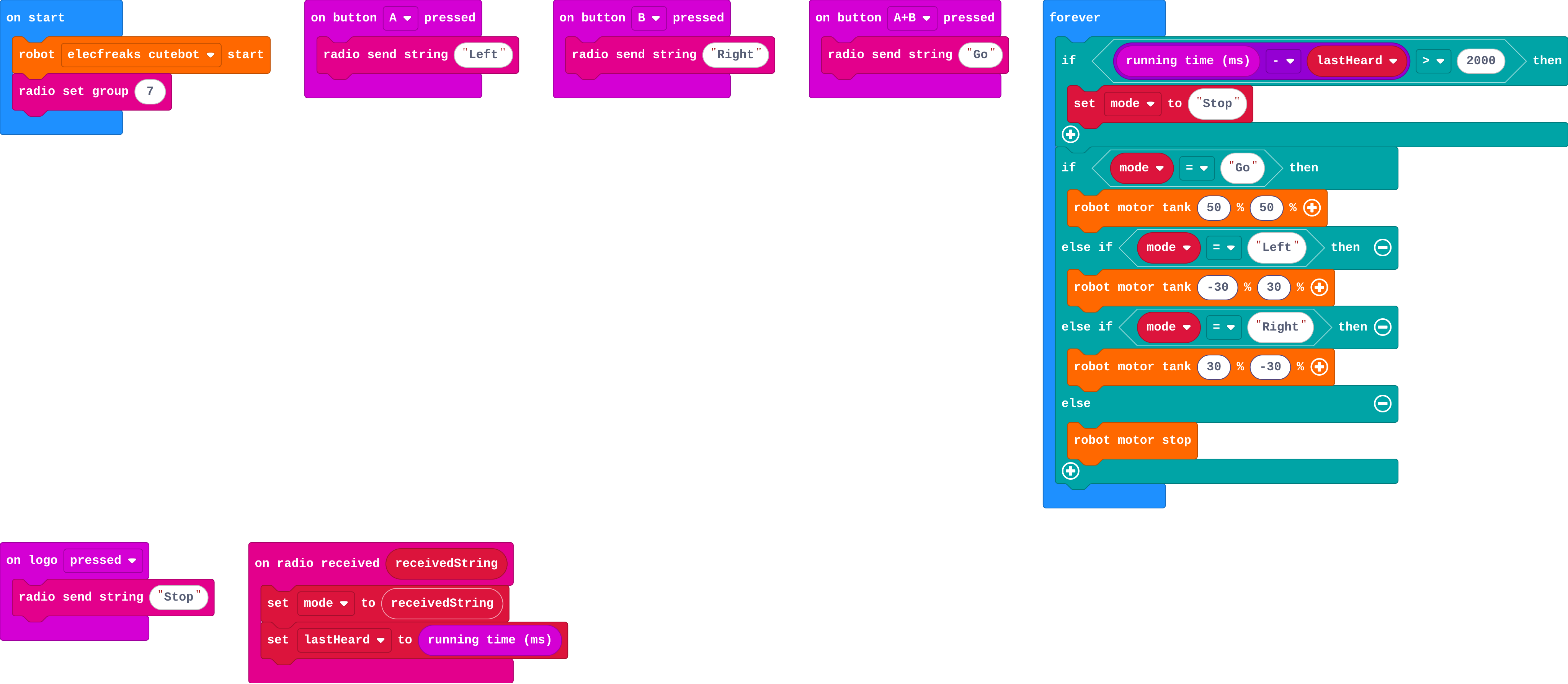
Show as code
radio.onReceivedString(function (receivedString) {
    mode = receivedString
    lastHeard = input.runningTime()
})
basic.forever(function () {
    if (input.runningTime() - lastHeard > 2000) {
        mode = "Stop"
    }
    if (mode == "Go") {
        robot.motorTank(50, 50)
    } else if (mode == "Left") {
        robot.motorTank(-30, 30)
    } else if (mode == "Right") {
        robot.motorTank(30, -30)
    } else {
        robot.motorStop()
    }
})
input.onButtonPressed(Button.A, function () {
    radio.sendString("Left")
})
input.onButtonPressed(Button.B, function () {
    radio.sendString("Right")
})
input.onButtonPressed(Button.AB, function () {
    radio.sendString("Go")
})
input.onLogoEvent(TouchButtonEvent.Pressed, function () {
    radio.sendString("Stop")
})
let lastHeard = 0
let mode = ""
robot.elecfreaksCuteBot.start()
radio.setGroup(7)
Read the signs
Show Go far away, tilted or half covered. Watch the label on the board: when is Go sent, and when does it say Unsure? Try the same with Left.
Drive with the signs: send Go and Stop, and find a way of holding Go that makes the board say Unsure.
Use the board. This ticks when you get there.
Investigate
Sort each decision: should it need high confidence or is lower fine?
Modify
Make Stop act the moment it arrives, without waiting for forever: stop, red lights, a beep.
Need a hint?
Before a hint: what kind of stuck is this? Try a strategy first
In on radio received string, after setting the mode: if mode = Stop, then robot motor stop, set color red and play a tone.
The board repeats each label every second, so "Go twice in a row" means about a second of steady Go. Make the robot wait for that before driving.
Need a hint?
Before a hint: what kind of stuck is this? Try a strategy first
Make a variable goCount. In on radio received string: if the word is Go, change goCount by 1, else set it to 0.
Another hint
In forever, drive forward only if mode = Go and goCount ≥ 2 (Logic › and).
Stop acts at once, as soon as it arrives: the robot stops, turns red and beeps.
This ticks by itself when your blocks do what is asked.
The robot drives forward only after hearing Go twice in a row.
This ticks by itself when your blocks do what is asked.
Make
Make a careful sign robot: Go only after hearing it twice in a row, Left and Right turn, and anything else (Stop, Unsure, a word it doesn't know, or two seconds of silence) stops it. Lights: green going, yellow turning, red stopped.
Need a hint?
Before a hint: what kind of stuck is this? Try a strategy first
Start from what you built: goCount, lastHeard and the watchdog.
Another hint
Lights: green going, yellow turning, red stopped. Go a little slower (40) so there is time to react.
A careful sign robot: Go only after two Gos in a row, Left and Right turn, anything else (Stop, Unsure, a word it doesn't know, or silence) stops it, with green, yellow and red lights.
This ticks by itself when your blocks do what is asked.
Lesson done. You've finished every step you need.
- Explain why some mistakes by a model cost more than others.
- Explain how a higher threshold trades speed for safety.
- Make a robot act on a costly label only when it is sure.
For teachers
Students drive a robot with printed signs read by their own model, and make it more careful where a mistake costs more (a higher threshold for Go, and Go twice in a row). About 50 minutes.
Open the teacher guide: answers, solutions, slides and a worksheet.
Students will be able to
- I can explain why some mistakes by a model cost more than others.
- I can explain how a higher threshold trades speed for safety.
- I can make a robot act on a costly label only when it is sure.
Before class
The idea: a model is sometimes wrong, and not all mistakes are equal. Mistaking Stop for Go can send a robot off a table; mistaking Left for Right only wastes time. So the board here needs 95% confidence before it sends Go and 70% for the others (anything less is Unsure), and the robot adds its own caution: it drives only after hearing Go twice in a row (about a second, since the board repeats the label every second), while Stop acts at once.
The cost of caution: a higher threshold means more Unsures, so the robot stops more often. Put the caution where mistakes are costly, not everywhere.
Materials: the printable signs (linked in the lesson; two to an A4 page, colour if possible). Training tip: hold each sign at different distances and angles, in different light, and add a Nothing class (no sign) if the model guesses a sign for an empty frame.
Teachable Machine still works: a student who trains there can export with Upload my model and paste the link into the box under Open your model file. Its webcam is mirrored; the Pattern Trainer's is not.
Without robots: the simulator's buttons stand in for the model; the board step is typical.
Running the lesson
- Predict: ask for a reason with each answer: what breaks?
- Read the signs: the moment Go turns into Unsure while Left still counts is the lesson.
- Investigate: the sort generalises; ask for one more example from each group.
- Modify: goCount is the robot's own threshold; link it back to the board's 95%.
The hard part (on purpose)
Accepting that some mistakes matter more, so the thresholds differ. Ask which wrong answer would be worst, and set that label's threshold first.
When students get stuck
- Go never gets sent. Ask: What confidence does the board show for Go? Fix: Retrain Go with more photos (closer, steadier, better light) until it passes 95%.
- The robot turns the wrong way. Ask: Which way did the arrow point when you trained? Fix: Check the class names; retrain if Left and Right photos were swapped.
- The robot never drives even with a clear Go. Ask: Does goCount reset only for words other than Go? Fix: Add 1 for Go, set 0 for anything else, and drive when goCount ≥ 2.
Stretch and support
Stretch: Add a Slow sign that drives at half speed, and decide what threshold it needs.
Support: Give the goCount blocks; students only add the and in forever.
Where it leads
Next: the delivery robot challenge, where the robot's own sensor can overrule the model. Real world: thresholds in self-driving cars, medical screening and spam filters.
What each step is for
- Read the signs: A borderline Go becomes Unsure while a borderline Left still counts: the same model behaves more carefully exactly where a mistake costs more.
- Investigate: A threshold trades caution for speed: a higher one means fewer wrong Gos but more Unsures (stops). Put the high threshold where a mistake costs most.
- Modify: The robot can add its own caution: act on a Stop at once, but act on Go only when it has heard it twice in a row.