---
marp: true
theme: default
html: true
---

# The first true question wins

micro:bit Foundations · Decide

<!-- Speaker note: Students add else if to ask more questions in a row, and see that the first true question wins, so the order of the questions sets the ranges. About 40 minutes (Predict and Run 8 min · Investigate 10 min · Modify 8 min · Mix it up 3 min · Make 8 min · Spirit level 3 min). -->

---

## Today

- I can use else if to choose between three or more things.
- I can say which part runs when more than one question is true.
- I can order the questions so every range can be reached.

<!-- Speaker note: Before class: Click the **+** at the bottom of an if block to add **else if** (another question). The micro:bit asks the questions **from the top**; the **first true one** runs and the rest are **skipped**. **else** runs only when every question above it is false. That makes ranges simple: *temperature < 15*, then *else if temperature < 25* means 15 to 24, because anything under 15 was already caught. It also makes order matter: ask *> 0* before *> 500* and the second can never run. Tilt in the simulator: move the mouse over the micro:bit. Teacher: Mix it up: last lesson's bike light, read at two light levels. -->

---

## Why it matters

> A spirit level shows whether a shelf is flat, tilted left or tilted right. One reading, three possible answers, and exactly one of them shows.

<!-- Speaker note: **if … else** chooses between two things. For three or more, click the **+** on an if block again: it adds **else if**, another question. The micro:bit asks the questions **from the top**. Tilting left makes **acceleration x** go below 0; tilting right makes it go above 0. A small tilt gives a small number. -->

---

<span style="background:#dbeafe; color:#1a1a1a; border:1.5px solid #3b82f6; padding:6px 18px; border-radius:8px; font-size:1em; font-weight:500;">💬 Discussion</span>

## Predict

![h:360](https://tutorials.learningwaypoints.com/_pictures/makecode/code/3e50420b71f4.png?v=50a4ea63ab42d2d6)

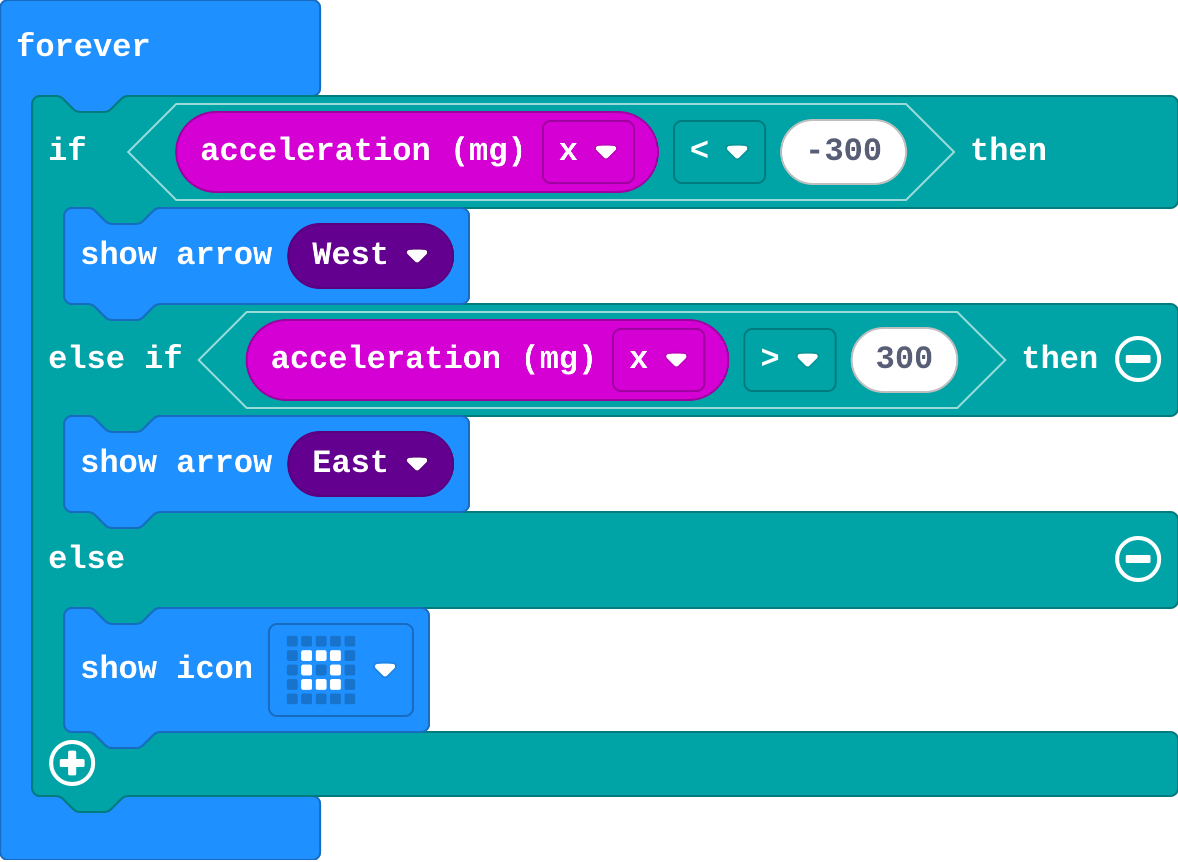
**You tilt the micro:bit a little to the left, just enough that acceleration x is -100. What shows?**

- An arrow pointing right
- Nothing
- An arrow pointing left
- The small square

<!-- Speaker note: What happens: The small square. -100 is not less than -300 and not more than 300, so neither question is true and the else part runs. Take two or three predictions before anyone runs it. -->

<!-- Speaker note: Teacher: -100 is the trap. It is negative, so many students pick the left arrow. Read the question aloud: is -100 less than -300? -->

---

<span style="background:#dcfce7; color:#1a1a1a; border:1.5px solid #22c55e; padding:6px 18px; border-radius:8px; font-size:1em; font-weight:500;">✅ Check</span>

## What happened?

* The small square. -100 is not less than -300 and not more than 300, so neither question is true and the else part runs.

<!-- Speaker note: Reveal after running. Ask who predicted it, and what made them think so. -->

---

<span style="background:#fef3c7; color:#1a1a1a; border:1.5px solid #f59e0b; padding:6px 18px; border-radius:8px; font-size:1em; font-weight:500;">✍️ Activity</span>

## Run it

Open the lesson at this step and try it together.

[tutorials.learningwaypoints.com/code/microbit/microbit-ranges/?full=step-2#step-2](https://tutorials.learningwaypoints.com/code/microbit/microbit-ranges/?full=step-2#step-2)

<!-- Speaker note: Move the mouse over the micro:bit to tilt it. Try a small tilt and a big tilt, left and right. Students should be able to say: I tilted the micro:bit a little and a lot, both ways, and compared what showed with my prediction. -->

<!-- Speaker note: Teacher: small tilts show the square. That middle zone is the else. -->

---

<span style="background:#dbeafe; color:#1a1a1a; border:1.5px solid #3b82f6; padding:6px 18px; border-radius:8px; font-size:1em; font-weight:500;">💬 Discussion</span>

## Investigate

![h:360](https://tutorials.learningwaypoints.com/_pictures/makecode/code/3e50420b71f4.png?v=50a4ea63ab42d2d6)

<!-- Speaker note: What this step is for: The questions are asked from the top. The first true one runs and the rest are skipped; else runs only when none are true. So the order of the questions decides the ranges. -->

<!-- Speaker note: Teacher: the trace pins down the edges (300 is not more than 300). Leo's tilt is the order mistake: the bigger question must be asked first. -->

---

<span style="background:#dcfce7; color:#1a1a1a; border:1.5px solid #22c55e; padding:6px 18px; border-radius:8px; font-size:1em; font-weight:500;">✅ Check</span>

## Trace the tilt

**For each value of acceleration x, what shows?**

| acceleration x | shows |
|---|---|
| -500 | ? |
| 0 | ? |
| 400 | ? |
| 300 | ? |

* Answer: left arrow, small square, right arrow, small square

<!-- Speaker note: -500 is less than -300, so the first part runs. 0 and 300 fit neither question (300 is not more than 300), so else runs. 400 is more than 300. -->

<style scoped>pre, marp-pre { font-size: 0.5em; line-height: 1.25; } section { font-size: 26px; }</style>

---

<span style="background:#dcfce7; color:#1a1a1a; border:1.5px solid #22c55e; padding:6px 18px; border-radius:8px; font-size:1em; font-weight:500;">✅ Check</span>

## Leo's tilt

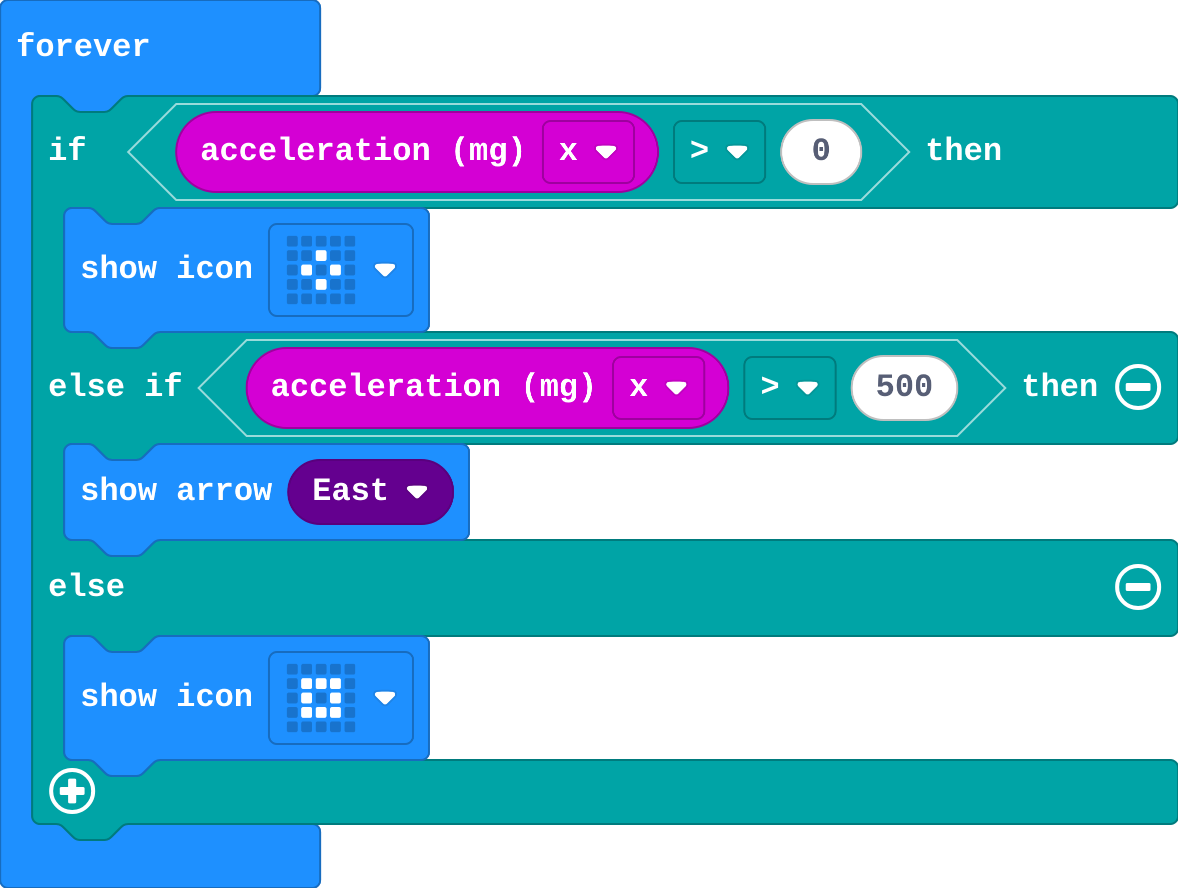
Leo's program:

![h:360](https://tutorials.learningwaypoints.com/_pictures/makecode/code/7b8ff79eef02.png?v=4a31889817558473)

**Leo wants a small tilt right to show a diamond and a big tilt right to show an arrow. The arrow never appears. Why?**

- The arrow needs its own if
- A big tilt is also more than 0
- 500 is too big to reach
- else if only works with &lt;

* Answer: A big tilt is also more than 0

<!-- Speaker note: The first question is true, so the rest are skipped. The questions are asked from the top, and the first true one wins. Any tilt over 500 is also over 0, so the diamond shows. Ask the bigger question first: > 500, then > 0. -->

<style scoped>pre, marp-pre { font-size: 0.5em; line-height: 1.25; } section { font-size: 24px; }</style>

---

<span style="background:#fef3c7; color:#1a1a1a; border:1.5px solid #f59e0b; padding:6px 18px; border-radius:8px; font-size:1em; font-weight:500;">✍️ Activity</span>

## Sorting hat <span style="font-size:.6em;color:#64748b">(4 min)</span>

The teacher reads three questions in order ("born in summer?", "in autumn?", else). Each student stands at the first sign that is true for them and stops there.

<!-- Speaker note: Then swap the order of two questions. Does anyone change sign? Why? -->

---

<span style="background:#fef3c7; color:#1a1a1a; border:1.5px solid #f59e0b; padding:6px 18px; border-radius:8px; font-size:1em; font-weight:500;">✍️ Activity</span>

## Modify


- **Fix Leo's tilt:** Leo's program is in the editor. Swap the questions so both parts can be reached.
- **Left as well:** Add another **else if** for a big tilt **left**.

[Open this step](https://tutorials.learningwaypoints.com/code/microbit/microbit-ranges/?full=step-4#step-4)

<!-- Speaker note: What this step is for: Each else if adds one range. Asking the wider question last keeps the narrower ones reachable. Hints, in order: Swap the two questions: > 500 first, then > 0. / Drag the arrow into the first part and the diamond into the else if part. / Click + to add another else if, above the else. / Use < -500 for a big tilt left, and show a left arrow. For students who need more support: Give students the if … else if … else already in forever with the pictures in, and ask them only to fill in the two questions. For early finishers: Make the comfort meter show five ranges (freezing, cold, right, warm, hot) with four questions. The hard part, on purpose: Seeing that only the first true question counts. Ask them to read the questions from the top with one value and stop at the first yes. When students get stuck: One picture never appears. Ask: Is there a value that makes its question true, and no question above it true? Fix: Put the narrower question first (> 500 before > 0). / The comfort meter shows hot for 20 degrees. Ask: Read your questions from the top with 20. Which is true first? Fix: Check the < and >, and the order: < 15, then < 25, then else. / There is no else if. Ask: Where is the + on the if block? Fix: Click the + twice: the first adds else, the next adds else if. -->

<!-- Speaker note: Teacher: students fix Leo's program in the editor, then add a fourth range. -->

---

<span style="background:#dbeafe; color:#1a1a1a; border:1.5px solid #3b82f6; padding:6px 18px; border-radius:8px; font-size:1em; font-weight:500;">💬 Discussion</span>

## Investigate: Mix it up

![h:360](https://tutorials.learningwaypoints.com/_pictures/makecode/code/3e2c51354c7e.png?v=15f0c3366e54b20a)

<!-- Speaker note: What this step is for: if … else runs exactly one part, decided by one sensor reading. -->

---

<span style="background:#dcfce7; color:#1a1a1a; border:1.5px solid #22c55e; padding:6px 18px; border-radius:8px; font-size:1em; font-weight:500;">✅ Check</span>

## Mix it up

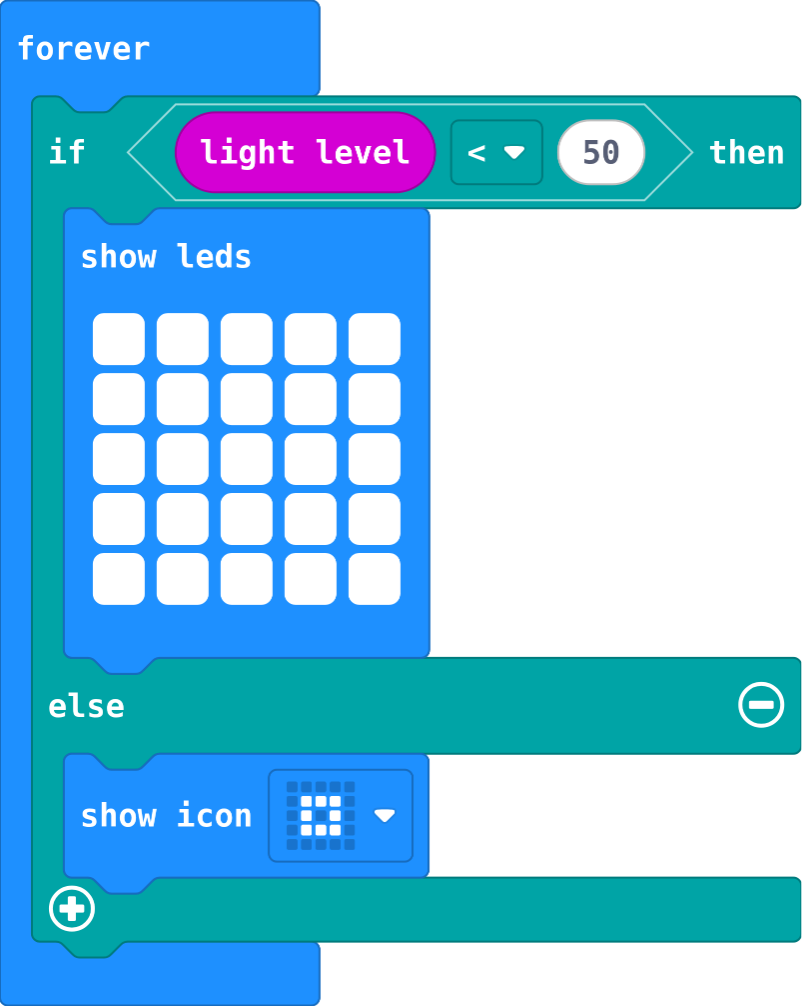
**This is last lesson's bike light. What does it show at each light level?**

| light level | shows |
|---|---|
| 30 | ? |
| 200 | ? |

* Answer: all the LEDs, small square

<!-- Speaker note: 30 is less than 50, so the first part runs: all the LEDs. 200 is not, so the else part runs: the small square. What this step is for: if … else runs exactly one part, decided by one sensor reading. -->

---

<span style="background:#fef3c7; color:#1a1a1a; border:1.5px solid #f59e0b; padding:6px 18px; border-radius:8px; font-size:1em; font-weight:500;">✍️ Activity</span>

## Make

Make a **comfort meter** for a classroom, in **one** if block with three parts:

- Below **15**: cold (draw it).
- From **15** to **24**: just right (a happy face).
- **25** and above: hot (draw it).

You need only two questions. The order does the rest.

[Open this step](https://tutorials.learningwaypoints.com/code/microbit/microbit-ranges/?full=step-6#step-6)

<!-- Speaker note: Hints, in order: One if block with an else if and an else. You need only two questions. / Ask < 15 first, then < 25. Anything under 15 was already caught by the first question. -->

<!-- Speaker note: Teacher: two questions make three ranges. Ask students to explain why the middle needs no 'and'. -->

---

<span style="background:#fef3c7; color:#1a1a1a; border:1.5px solid #f59e0b; padding:6px 18px; border-radius:8px; font-size:1em; font-weight:500;">✍️ Activity</span>

## Change a spirit level

This spirit level points the way to tilt back to flat, and shows a tick when it is level. Make it fussier (a smaller tilt counts as not level), then make it check **forward and back** as well.

[Open this step](https://tutorials.learningwaypoints.com/code/microbit/microbit-ranges/?full=step-7#step-7)

---

<span style="background:#fef3c7; color:#1a1a1a; border:1.5px solid #f59e0b; padding:6px 18px; border-radius:8px; font-size:1em; font-weight:500;">✍️ Activity</span>

## Call the range <span style="font-size:.6em;color:#64748b">(3 min)</span>

Show your comfort meter to the next pair. They drag the slider and call out the range before it shows.

---

<span style="background:#dcfce7; color:#1a1a1a; border:1.5px solid #22c55e; padding:6px 18px; border-radius:8px; font-size:1em; font-weight:500;">✅ Check</span>

## Exit ticket

**if temperature &gt; 0 … else if temperature &gt; 30 … What shows at 35 degrees, and why?**

* The first part. 35 is more than 0, so the first question is true and the rest are skipped. Ask &gt; 30 first.

<!-- Speaker note: Students answer on paper or a mini whiteboard before the reveal. Anyone who cannot answer needs the main idea again next lesson. Where this leads: Next unit: lists, which keep many values under one name. Class ideas: a tilt game where players hold the micro:bit level for ten seconds; a comfort meter by each classroom window with real micro:bits. -->