---
marp: true
theme: default
html: true
---

# Level up

Arcade advanced skills · Levels

<!-- Speaker note: Students keep the level in a variable, change it where the score changes with a goal that moves up, see why a level-up in on game update fires every frame, and add levels to their runner. About 45 minutes (Predict and Run 8 min · Investigate 12 min · Modify 8 min · Mix it up 3 min · Make 10 min · Fishing 4 min). -->

---

## Today

- I can use a variable to remember the level, and change it by 1.
- I can put a level-up where the score changes, with a goal that moves up.
- I can explain why a level-up in on game update happens every frame.

<!-- Speaker note: Before class: A **level** is a variable that starts at 1 and changes by 1. The level-up is an if in the event where the score changes (here the coin overlap): *if score ≥ goal*, change level by 1, change **goal** by 5, splash and add an enemy. goal is a target that moves up, so the question is false again until 5 more coins. The trap is the lesson's misconception: put *if score ≥ 5* in **on game update** and it fires **every frame** while the score stays 5 or more, so the level races up. The splash uses join ("Level " + level), labelled copy-for-now. Next lesson keeps what changes per level in a list. Teacher: Mix it up: the jump from last lesson. -->

---

## Why it matters

> Why does a game get harder the longer you survive? Usually it's one number going up.

<!-- Speaker note: A game with levels needs a **variable**, `level`, that remembers where the player is, and one place where it goes up. This game also keeps a **goal**: the score the next level needs. The splash uses **join** (in **Text**) to stick the word *Level* and the number together. Copy it as it is for now. -->

---

<span style="background:#dbeafe; color:#1a1a1a; border:1.5px solid #3b82f6; padding:6px 18px; border-radius:8px; font-size:1em; font-weight:500;">💬 Discussion</span>

## Predict

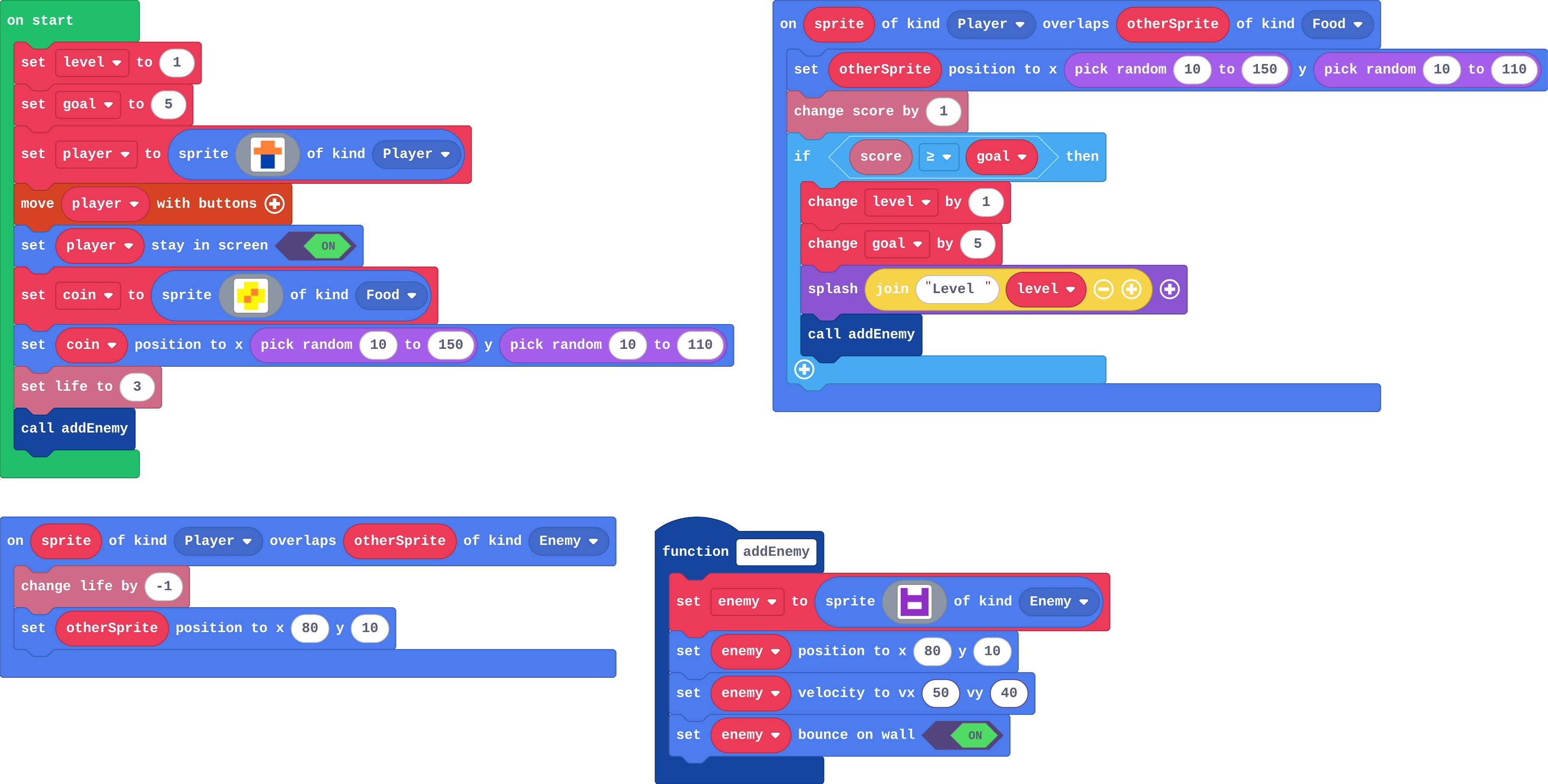
![h:360](https://tutorials.learningwaypoints.com/_pictures/makecode/code/7e3c142f3068.png?v=8e670d24f65bd560)

**You collect 5 coins, then one more. What happens?**

- Every coin is a new level
- At 5 coins: Level 2. At 6: Level 3
- At 5 coins the first enemy is replaced by a faster one
- At 5 coins: a Level 2 splash and a second enemy. At 6: nothing new

<!-- Speaker note: What happens: At 5 coins the if is true: level becomes 2, goal becomes 10, a splash shows Level 2 and addEnemy makes a second enemy. At 6 coins, 6 is less than 10, so nothing new happens. Take two or three predictions before anyone runs it. -->

<!-- Speaker note: Teacher: most students expect Level 2 at 5 coins. Ask what happens at 6. -->

---

<span style="background:#dcfce7; color:#1a1a1a; border:1.5px solid #22c55e; padding:6px 18px; border-radius:8px; font-size:1em; font-weight:500;">✅ Check</span>

## What happened?

* At 5 coins the if is true: level becomes 2, goal becomes 10, a splash shows Level 2 and addEnemy makes a second enemy. At 6 coins, 6 is less than 10, so nothing new happens.

<!-- Speaker note: Reveal after running. Ask who predicted it, and what made them think so. -->

---

<span style="background:#fef3c7; color:#1a1a1a; border:1.5px solid #f59e0b; padding:6px 18px; border-radius:8px; font-size:1em; font-weight:500;">✍️ Activity</span>

## Run it

Open the lesson at this step and try it together.

[tutorials.learningwaypoints.com/code/arcade-advanced/arcade-levels/?full=step-2#step-2](https://tutorials.learningwaypoints.com/code/arcade-advanced/arcade-levels/?full=step-2#step-2)

<!-- Speaker note: Collect coins and dodge the enemies. Press **A** (space) to close each splash. Students should be able to say: I reached level 2 (or further) and compared with my prediction. -->

---

<span style="background:#dbeafe; color:#1a1a1a; border:1.5px solid #3b82f6; padding:6px 18px; border-radius:8px; font-size:1em; font-weight:500;">💬 Discussion</span>

## Investigate

![h:360](https://tutorials.learningwaypoints.com/_pictures/makecode/code/7e3c142f3068.png?v=8e670d24f65bd560)

<!-- Speaker note: What this step is for: A level goes up where the score changes, and a goal that moves up makes the question false again until the next level. -->

<!-- Speaker note: Teacher: Ben's game shows why goal moves; Zoe's shows why on game update is the wrong place. -->

---

<span style="background:#dcfce7; color:#1a1a1a; border:1.5px solid #22c55e; padding:6px 18px; border-radius:8px; font-size:1em; font-weight:500;">✅ Check</span>

## Level and goal

**level starts at 1 and goal at 5. Fill in level and goal after each coin.**

| score | level | goal |
|---|---|---|
| 0 | 1 | 5 |
| 5 | ? | ? |
| 6 | ? | ? |
| 10 | ? | ? |

* Answer: 2, 10, 2, 10, 3, 15

<!-- Speaker note: The level only goes up when the score reaches goal, and goal moves up by 5 each time, so the next level is 5 coins away. -->

<style scoped>pre, marp-pre { font-size: 0.5em; line-height: 1.25; } section { font-size: 24px; }</style>

---

<span style="background:#dcfce7; color:#1a1a1a; border:1.5px solid #22c55e; padding:6px 18px; border-radius:8px; font-size:1em; font-weight:500;">✅ Check</span>

## Ben's game

**Ben deleted change goal by 5. What happens after his 5th coin?**

- The level never goes up
- The game ends
- Every coin after that is a new level
- Nothing: the game works the same

* Answer: Every coin after that is a new level

<!-- Speaker note: Without the moving goal, the question score ≥ 5 stays true for coin 6, 7, 8 and every coin after, so each one levels up. -->

---

<span style="background:#dcfce7; color:#1a1a1a; border:1.5px solid #22c55e; padding:6px 18px; border-radius:8px; font-size:1em; font-weight:500;">✅ Check</span>

## Zoe's levels

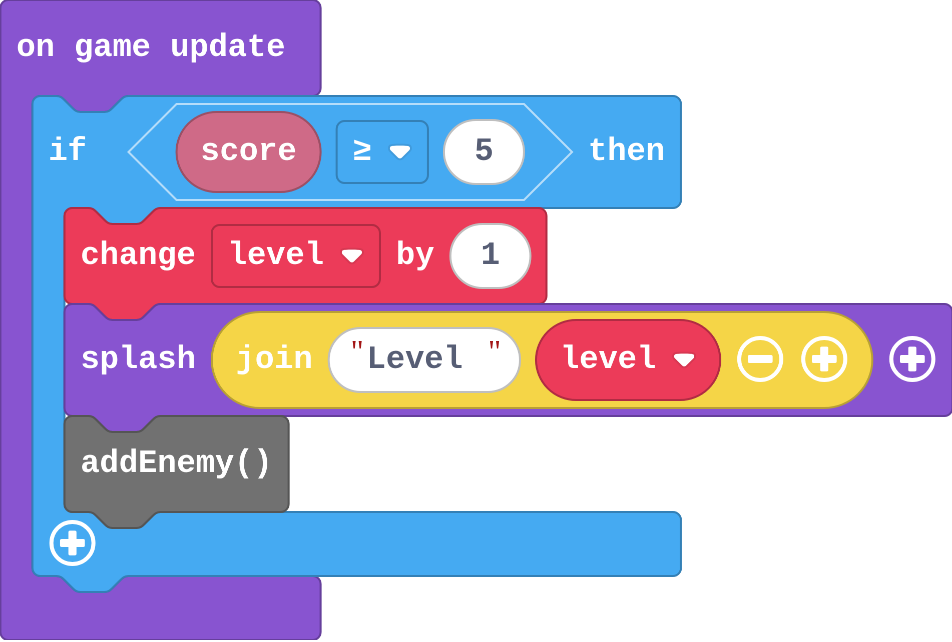
Zoe's level-up:

![h:320](https://tutorials.learningwaypoints.com/_pictures/makecode/code/17f7baa90863.png?v=04a0d9b34b036071)

**Zoe moved the level-up into on game update (below). The moment she reaches 5 points the splashes never stop, though she collects no more coins. Why?**

- The if stays true every frame once score is 5
- The goal is too small
- The splash adds points
- score ≥ 5 should be score &gt; 5

* Answer: The if stays true every frame once score is 5

<!-- Speaker note: on game update runs every frame, and an if there is asked every frame. Once the score is 5, the question stays true, so the level goes up again and again. Level up where the score changes: in the overlap. -->

<style scoped>pre, marp-pre { font-size: 0.5em; line-height: 1.25; } section { font-size: 22px; }</style>

---

<span style="background:#fef3c7; color:#1a1a1a; border:1.5px solid #f59e0b; padding:6px 18px; border-radius:8px; font-size:1em; font-weight:500;">✍️ Activity</span>

## Ring the bell <span style="font-size:.6em;color:#64748b">(3 min)</span>

One student counts up aloud; another rings (claps) when the count reaches the goal, then moves the goal up by 5. Then try without moving the goal.

<!-- Speaker note: Without the moving goal, every number after 5 rings. -->

---

<span style="background:#fef3c7; color:#1a1a1a; border:1.5px solid #f59e0b; padding:6px 18px; border-radius:8px; font-size:1em; font-weight:500;">✍️ Activity</span>

## Modify


- **Shorter levels:** Make a new level come every **3** coins.
- **Bonus life:** Give the player a **bonus life** at every new level. One block, in the right place.

[Open this step](https://tutorials.learningwaypoints.com/code/arcade-advanced/arcade-levels/?full=step-4#step-4)

<!-- Speaker note: What this step is for: The goal's step sets how long a level lasts, and anything inside the level-up if happens once per level. Hints, in order: Two numbers: the goal you start with and how much it changes by. / Both 3. / change life by 1 (Info) goes inside the level-up if. For students who need more support: Give students the level and goal variables in the Make starter, so they write only the if in the timer. For early finishers: Win the game at level 5: an if inside the level-up with game over (win). The hard part, on purpose: Where the level-up goes. When levels race up, ask how often that block runs. When students get stuck: The level races up as soon as the score reaches the goal. Ask: Where is the level-up if, and how often does that block run? Does goal move up? Fix: Put it in the event where the score changes, and change goal by 10 inside it. / The splash says Level 1 after the first level-up. Ask: Is change level by 1 before or after the splash? Fix: Change the level first, then splash. / The rocks get slower, not faster. Ask: Which way do the rocks fly? Fix: Left, so faster is more negative: change speed by -20. -->

<!-- Speaker note: Teacher: both numbers must change for every 3 coins. The bonus life shows the if runs once per level. -->

---

<span style="background:#dbeafe; color:#1a1a1a; border:1.5px solid #3b82f6; padding:6px 18px; border-radius:8px; font-size:1em; font-weight:500;">💬 Discussion</span>

## Investigate: Mix it up

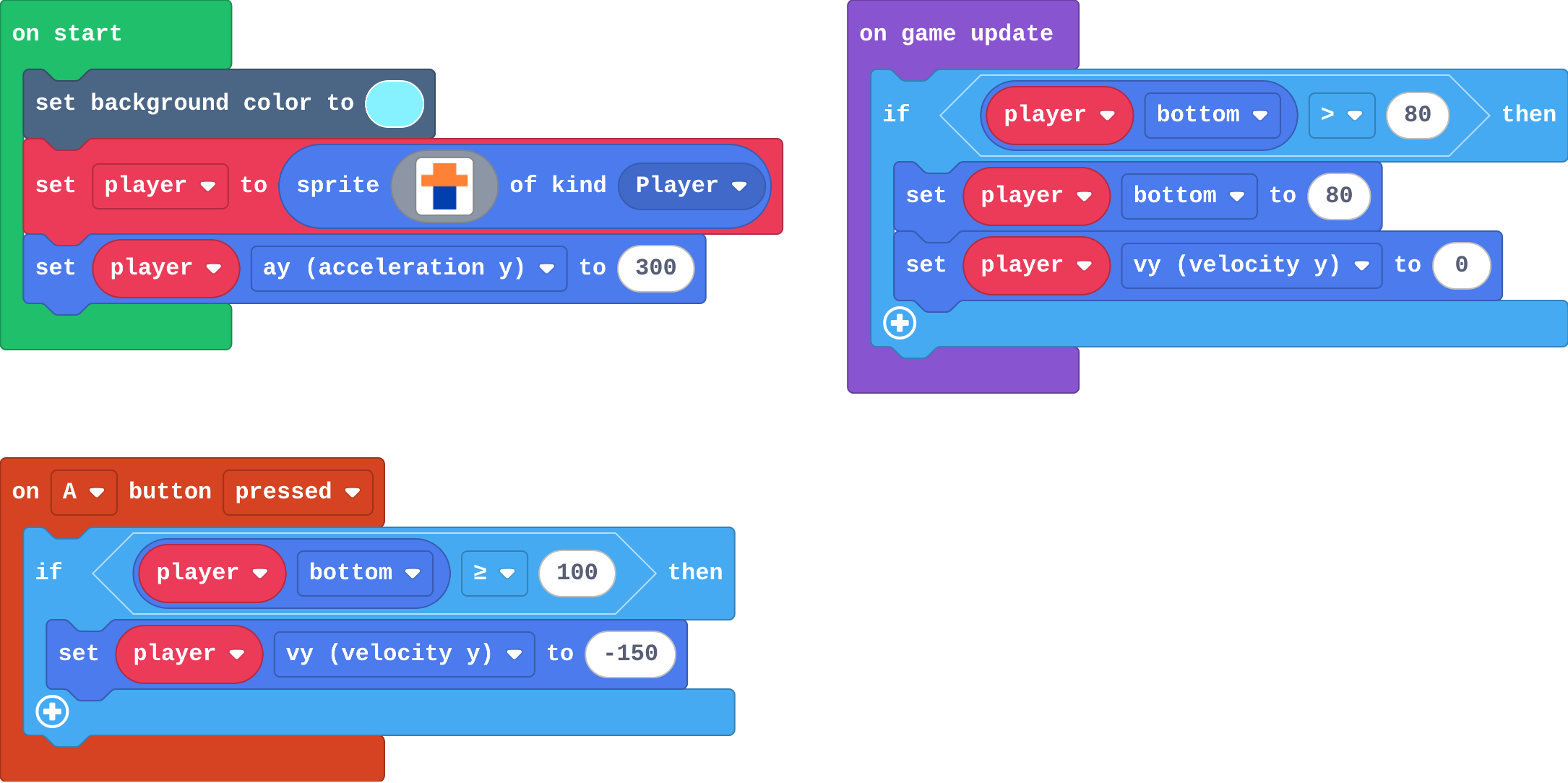
![h:360](https://tutorials.learningwaypoints.com/_pictures/makecode/code/c9aa84d9b824.png?v=9c9e739b5c583bd0)

<!-- Speaker note: What this step is for: A jump belongs inside an if that asks whether the player is on the floor. -->

---

<span style="background:#dcfce7; color:#1a1a1a; border:1.5px solid #22c55e; padding:6px 18px; border-radius:8px; font-size:1em; font-weight:500;">✅ Check</span>

## Mix it up

**Ana raises the floor: the floor if now puts the player's bottom at 80. Her jump still asks bottom ≥ 100. What number should the jump ask about now?**

* Answer: 80

<!-- Speaker note: Standing now means bottom is 80. At ≥ 100 the jump never works, because the player never gets that low. What this step is for: A jump belongs inside an if that asks whether the player is on the floor. -->

---

<span style="background:#fef3c7; color:#1a1a1a; border:1.5px solid #f59e0b; padding:6px 18px; border-radius:8px; font-size:1em; font-weight:500;">✍️ Activity</span>

## Make

This is your runner from last lesson. Every rock that appears scores a point. Give it **levels**:

- every **10** points the level goes up, with a splash,
- each new level, the rocks are **faster** (change speed by -20: they fly left),
- the level-up goes **where the score changes**: in the timer.

[Open this step](https://tutorials.learningwaypoints.com/code/arcade-advanced/arcade-levels/?full=step-6#step-6)

<!-- Speaker note: Hints, in order: Two new variables in on start: level 1 and goal 10. / The score changes in the timer, so the level-up goes there, just after change score. / Inside the if: change level by 1, change goal by 10, change speed by -20, and a splash. -->

<!-- Speaker note: Teacher: the runner's score changes in the timer, so the level-up goes there. -->

---

<span style="background:#fef3c7; color:#1a1a1a; border:1.5px solid #f59e0b; padding:6px 18px; border-radius:8px; font-size:1em; font-weight:500;">✍️ Activity</span>

## Change a fishing game

Catch fish with the net. Every 5 fish the level goes up and the fish swim faster. Make the water **darker** at every level too: one block, in the level-up.

[Open this step](https://tutorials.learningwaypoints.com/code/arcade-advanced/arcade-levels/?full=step-7#step-7)

---

<span style="background:#fef3c7; color:#1a1a1a; border:1.5px solid #f59e0b; padding:6px 18px; border-radius:8px; font-size:1em; font-weight:500;">✍️ Activity</span>

## Level race <span style="font-size:.6em;color:#64748b">(4 min)</span>

Play the next pair's runner. Which level did you reach?

---

<span style="background:#dcfce7; color:#1a1a1a; border:1.5px solid #22c55e; padding:6px 18px; border-radius:8px; font-size:1em; font-weight:500;">✅ Check</span>

## Exit ticket

**Why does a level-up go in the event where the score changes, not in on game update?**

* on game update runs every frame, so while the score stays high enough the level goes up every frame. In the event it is asked only when the score changes.

<!-- Speaker note: Students answer on paper or a mini whiteboard before the reveal. Anyone who cannot answer needs the main idea again next lesson. Where this leads: Next: a list per level, so each level can have its own background and speed. Skillmap: Jungle Jump Platformer (arcade.makecode.com/skillmaps) moves between level maps. -->