← Robotics challenges

Robotics challenges: recap

For after the lessons: one card per lesson, to check what you remember. Answer each question in your head or on paper first, then check it. Nothing here is marked.

Drive

1. Drive and stop

Try firstWhy does a robot keep moving after its last 'for 500 ms' block?

Check your answer

The time only says when to move on to the next block. The motors keep their last speed until a block such as robot motor stop changes them.

robot motor tank sets the left and right wheel speeds (−100 to 100).

  • Same speeds: straight. Opposite speeds: spin. Different speeds: curve.
  • for … ms keeps that speed for a time, then moves on to the next block. It does not stop the robot.
  • End with robot motor stop.
The program as blocks
Show as code
robot.elecfreaksCuteBot.start()
robot.motorTank(50, 50, 1000)
robot.motorTank(50, -50, 500)
robot.motorStop()
The example, as blocks
Open the lesson →

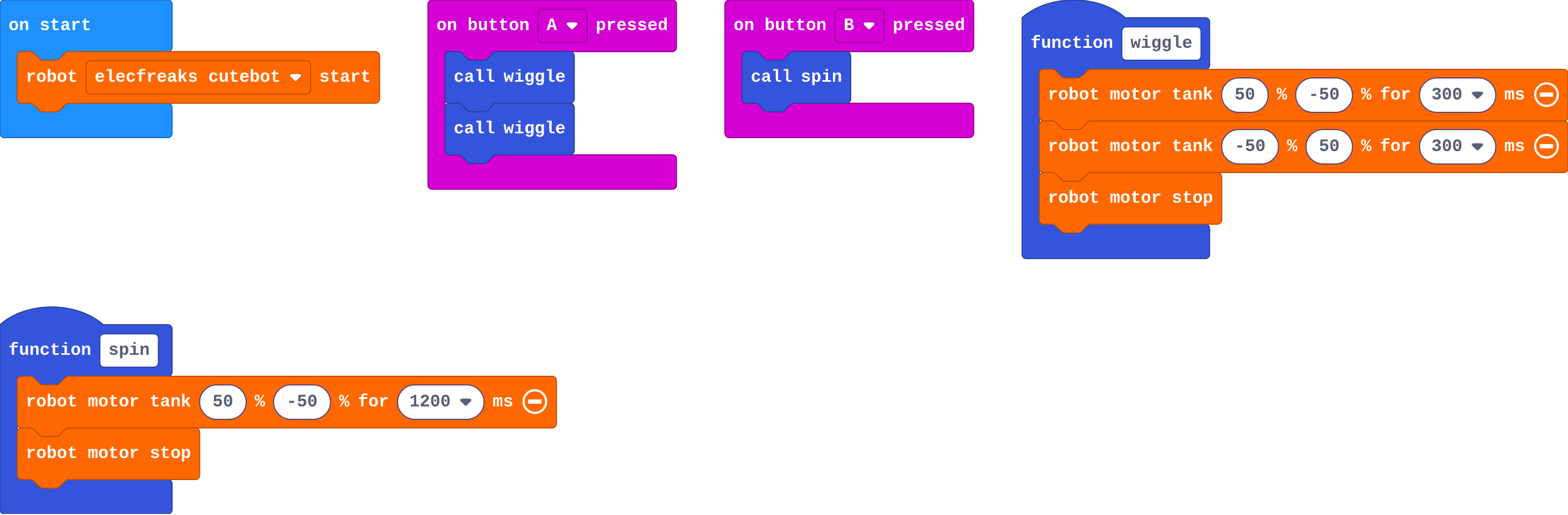
2. Moves as functions

Try firstWhy is a dance easier to change when each move is a function?

Check your answer

You change a move in one place, and every call to it in the routine changes too. The routine itself reads as a list of names.

A function is a named move. Make it once; call it to run it.

  • Each move ends with robot motor stop.
  • A routine is calls in order: wiggle, spin, wiggle.
  • Making a function does nothing until something calls it.
The program as blocks
Show as code
function wiggle () {
    robot.motorTank(50, -50, 300)
    robot.motorTank(-50, 50, 300)
    robot.motorStop()
}
function spin () {
    robot.motorTank(50, -50, 1200)
    robot.motorStop()
}
input.onButtonPressed(Button.A, function () {
    wiggle()
    wiggle()
})
input.onButtonPressed(Button.B, function () {
    spin()
})
robot.elecfreaksCuteBot.start()
The example, as blocks
Open the lesson →

Sense

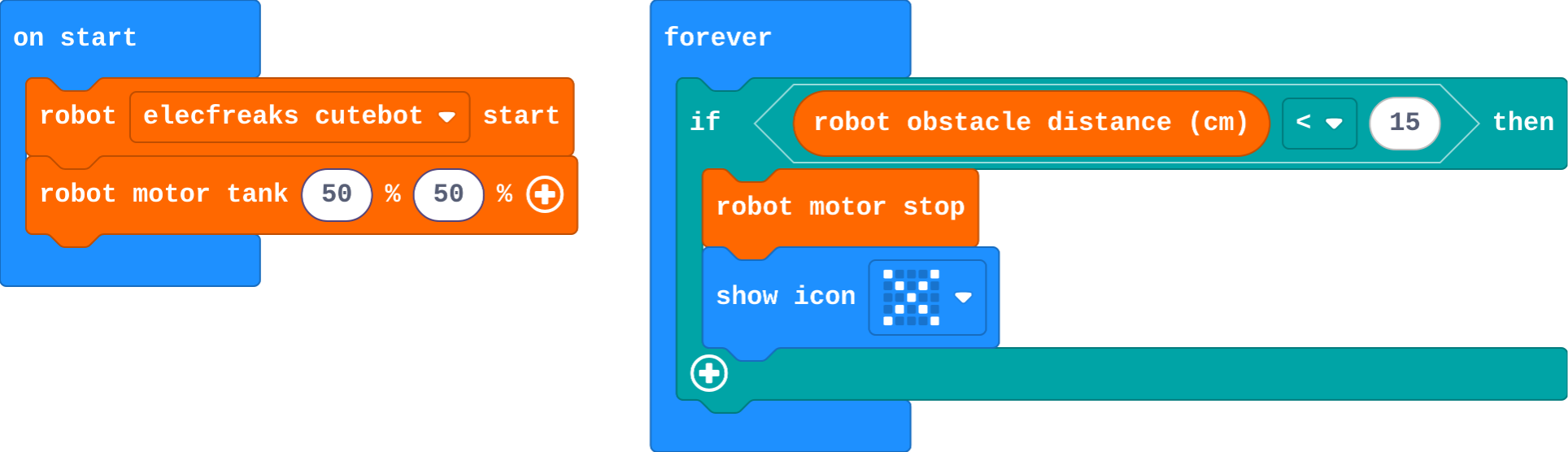
3. Stop before you crash

Try firstWhy does Mia's robot crash when the if is not inside forever?

Check your answer

It checks the distance once, at the start, when the box is still far away. It never checks again, so it never stops.

The distance sensor gives how far away the nearest object is, in centimetres (up to 40).

  • Read it inside forever, so the robot keeps checking as it moves.
  • if distance < 15 → stop leaves room, because the robot rolls a little after it is told to stop.
  • if / else if / else gives different answers for different distances. Ask about the closest first.
The program as blocks
Show as code
robot.elecfreaksCuteBot.start()
robot.motorTank(50, 50)
basic.forever(function () {
    if (robot.obstacleDistance() < 15) {
        robot.motorStop()
        basic.showIcon(IconNames.No)
    }
})
The example, as blocks
Open the lesson →

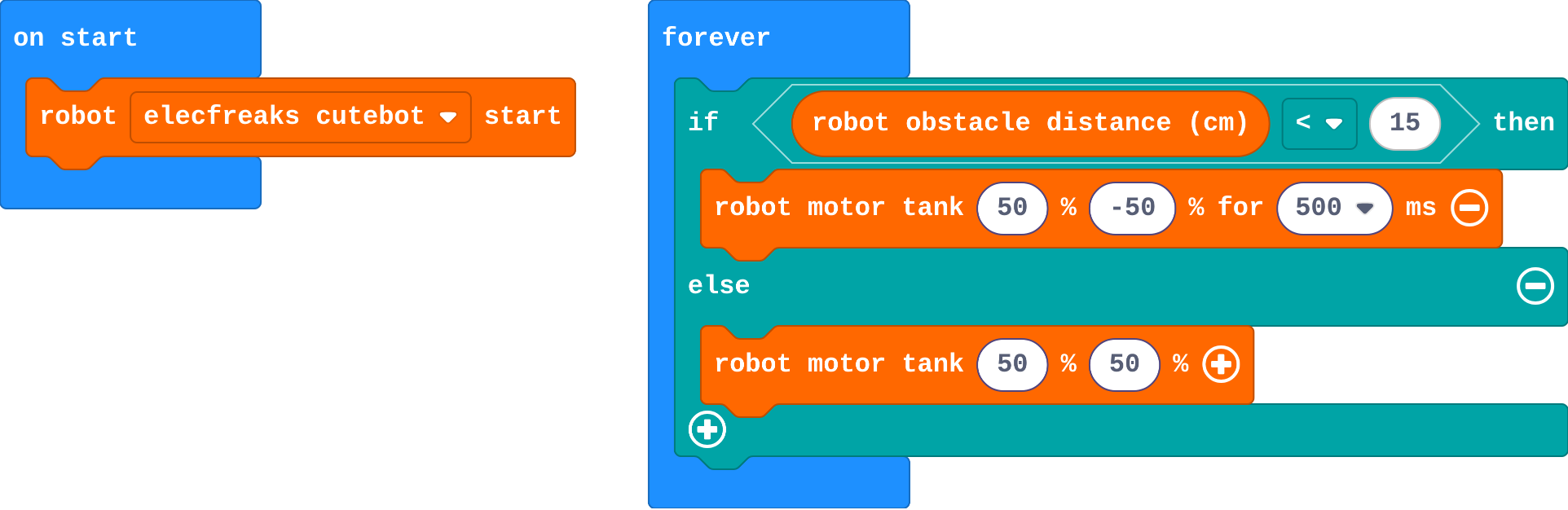
4. Avoid and explore

Try firstHow does if … else inside forever let a robot explore a room without a plan?

Check your answer

Every time round, it checks the distance and chooses: turn away if something is close, else drive forward. Many small choices add up to exploring.

if … else chooses one of two moves.

  • Inside forever, the robot checks and chooses again every time round.
  • A branch can hold a short routine: back up, then turn.
  • pick random 0 to 1 gives a coin toss, so the robot does not always turn the same way.
The program as blocks
Show as code
robot.elecfreaksCuteBot.start()
basic.forever(function () {
    if (robot.obstacleDistance() < 15) {
        robot.motorTank(50, -50, 500)
    } else {
        robot.motorTank(50, 50)
    }
})
The example, as blocks
Open the lesson →

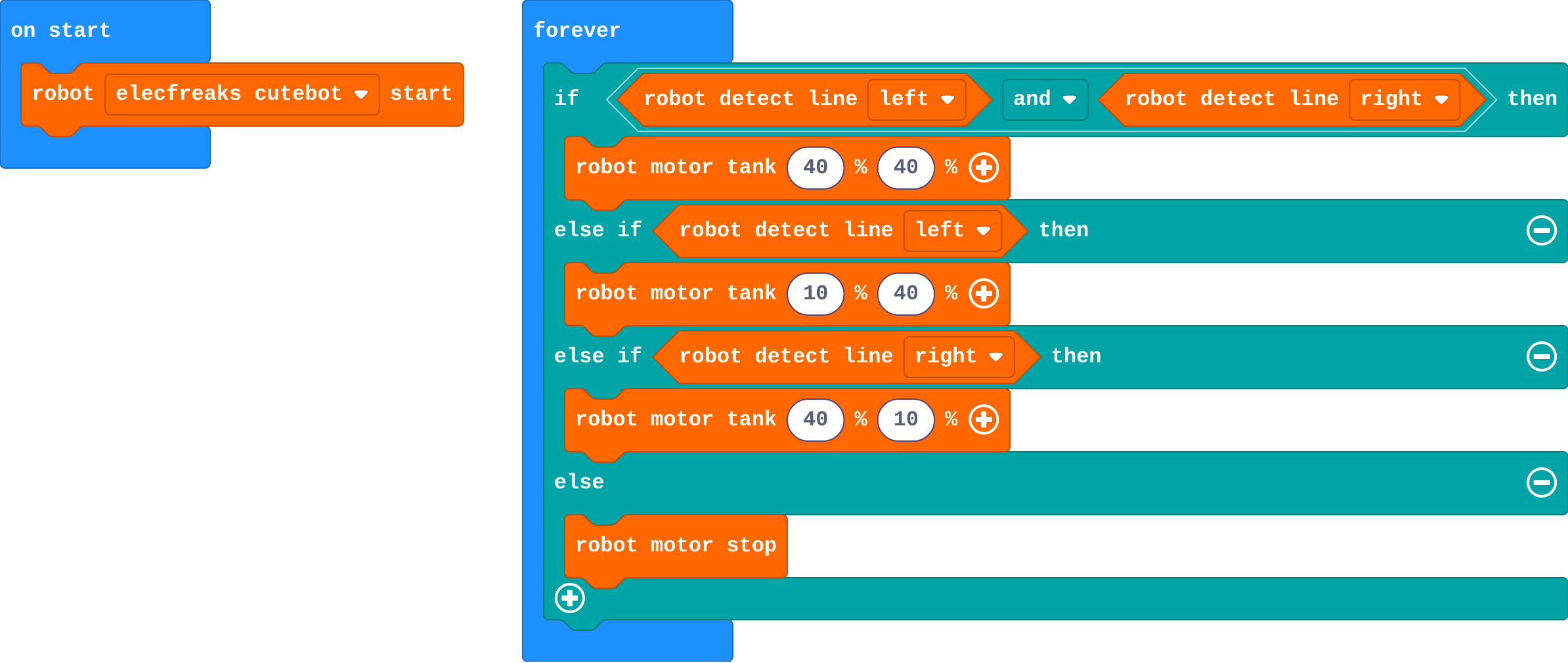
5. Follow the line

Try firstOnly the right sensor sees the line. Which way should the robot steer, and why?

Check your answer

Right: the line is on the right, so steering right brings the robot back over it.

Two line sensors tell the robot which side the line is on.

  • Both see it: drive straight.
  • Only one sees it: steer towards that side.
  • Neither: the line is lost; stop.

When two sensors matter, ask the most important question first (something in the way? then stop).

The program as blocks
Show as code
robot.elecfreaksCuteBot.start()
basic.forever(function () {
    if (robot.detectLine(RobotLineDetector.Left) && robot.detectLine(RobotLineDetector.Right)) {
        robot.motorTank(40, 40)
    } else if (robot.detectLine(RobotLineDetector.Left)) {
        robot.motorTank(10, 40)
    } else if (robot.detectLine(RobotLineDetector.Right)) {
        robot.motorTank(40, 10)
    } else {
        robot.motorStop()
    }
})
The example, as blocks
Open the lesson →

Modes

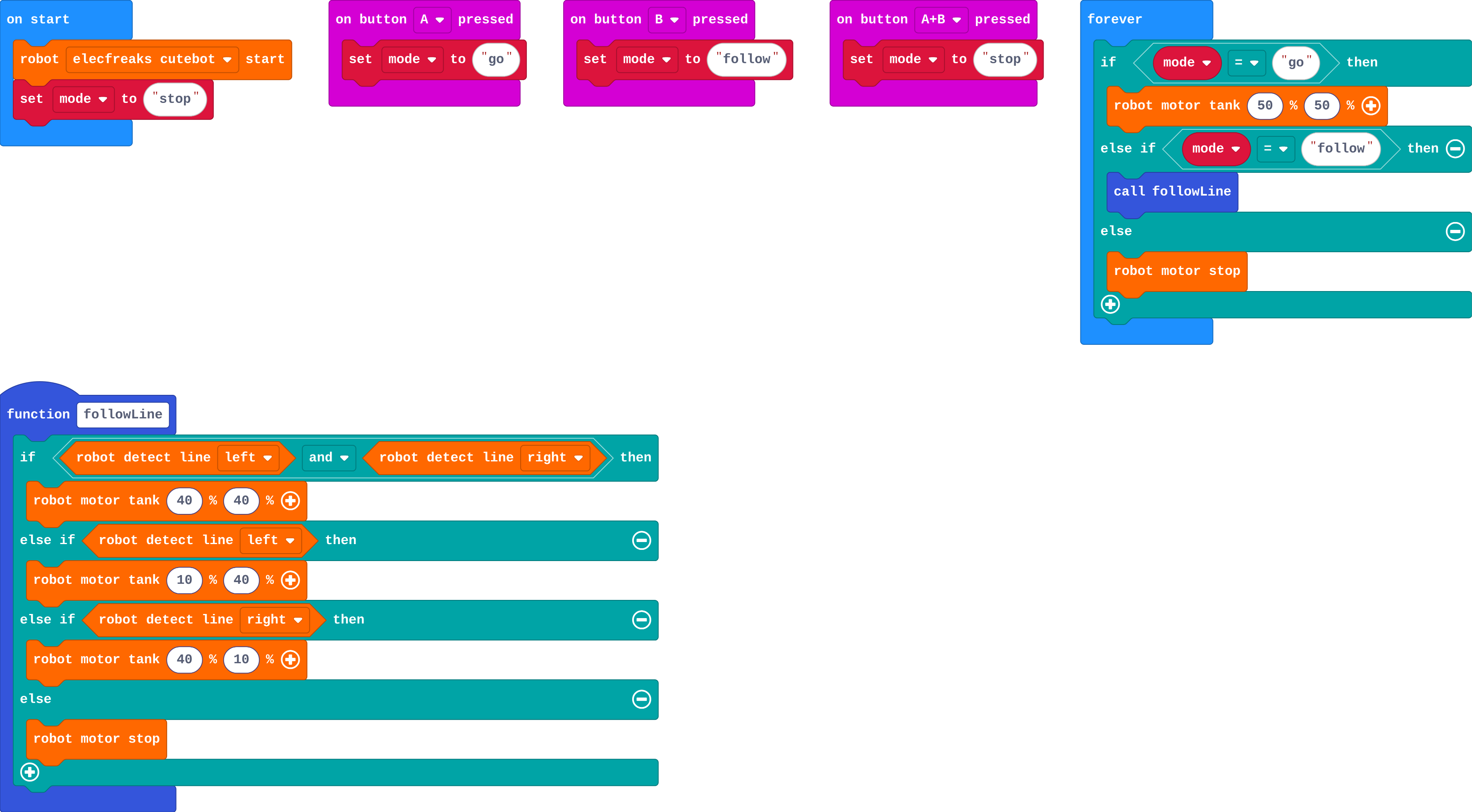
6. One robot, many jobs

Try firstWhy does the robot keep following the line after you let go of B?

Check your answer

B set the mode variable to follow. The variable keeps that value, and forever checks it every time round, so it keeps calling followLine.

A mode variable remembers which job the robot is doing.

  • Buttons only change the mode.
  • forever checks the mode every time round and does that job.
  • A new job needs: a mode name, something that sets it, and a branch in forever.
The program as blocks
Show as code
function followLine () {
    if (robot.detectLine(RobotLineDetector.Left) && robot.detectLine(RobotLineDetector.Right)) {
        robot.motorTank(40, 40)
    } else if (robot.detectLine(RobotLineDetector.Left)) {
        robot.motorTank(10, 40)
    } else if (robot.detectLine(RobotLineDetector.Right)) {
        robot.motorTank(40, 10)
    } else {
        robot.motorStop()
    }
}
input.onButtonPressed(Button.A, function () {
    mode = "go"
})
input.onButtonPressed(Button.B, function () {
    mode = "follow"
})
input.onButtonPressed(Button.AB, function () {
    mode = "stop"
})
let mode = ""
robot.elecfreaksCuteBot.start()
mode = "stop"
basic.forever(function () {
    if (mode == "go") {
        robot.motorTank(50, 50)
    } else if (mode == "follow") {
        followLine()
    } else {
        robot.motorStop()
    }
})
The example, as blocks
Open the lesson →

Talk

7. Remote control

Try firstThe remote sends 2. Where is it decided what 2 means?

Check your answer

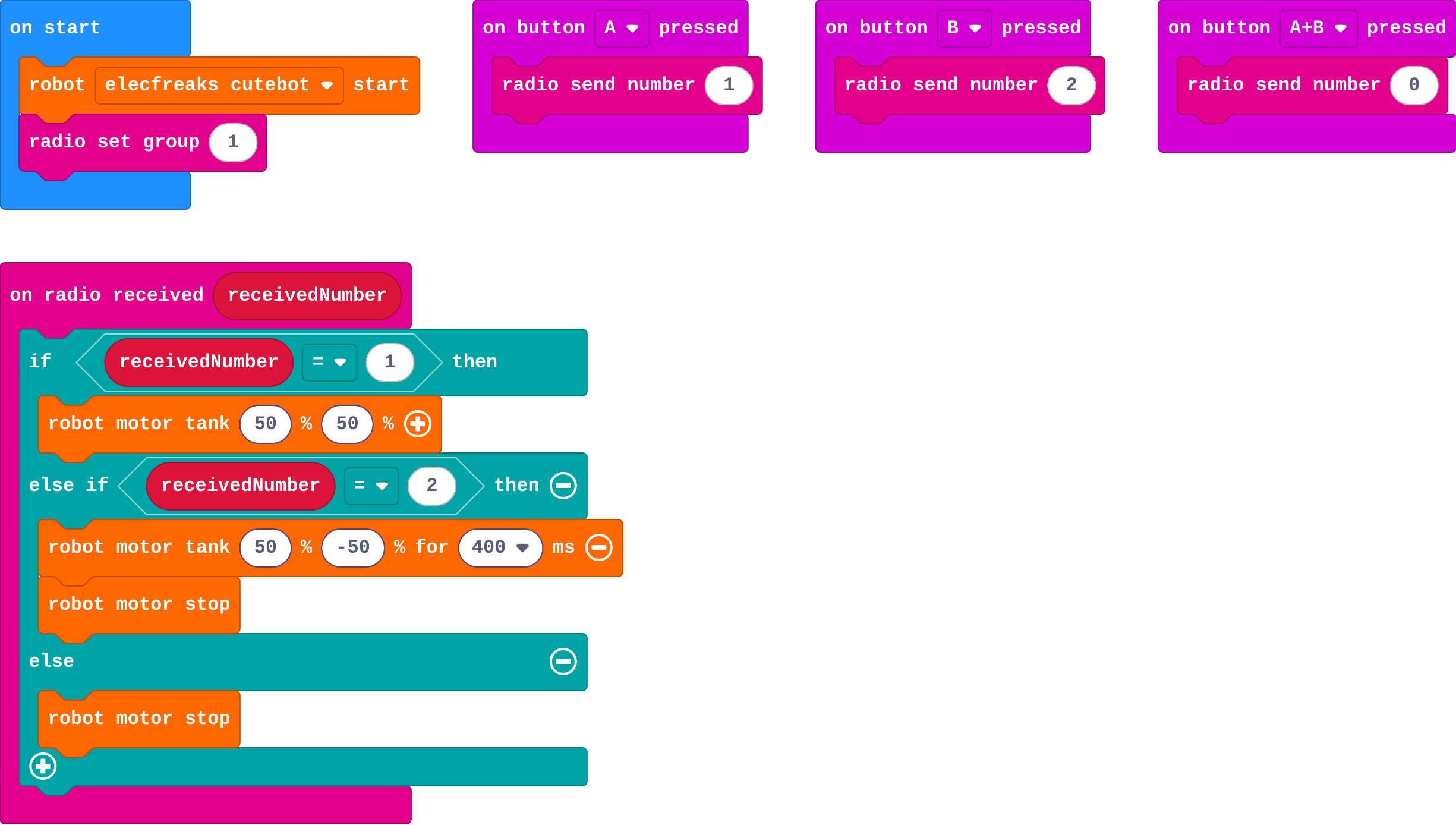
On the robot, in on radio received. The remote only sends the number; the robot's code turns it into a move.

A remote sends a number for each button; the robot turns each number into a move.

  • Both must use the same radio group.
  • Both must agree on the code: what each number means.
  • A micro:bit never hears its own messages.
The program as blocks
Show as code
input.onButtonPressed(Button.A, function () {
    radio.sendNumber(1)
})
input.onButtonPressed(Button.B, function () {
    radio.sendNumber(2)
})
input.onButtonPressed(Button.AB, function () {
    radio.sendNumber(0)
})
radio.onReceivedNumber(function (receivedNumber) {
    if (receivedNumber == 1) {
        robot.motorTank(50, 50)
    } else if (receivedNumber == 2) {
        robot.motorTank(50, -50, 400)
        robot.motorStop()
    } else {
        robot.motorStop()
    }
})
robot.elecfreaksCuteBot.start()
radio.setGroup(1)
The example, as blocks
Open the lesson →

8. Conductor and dancers

Try firstWhy does each phrase play its music until done before the next phrase starts?

Check your answer

So the next cue is only sent when the music reaches the next phrase. The robots then move in time with the tune.

The conductor sends a cue as each phrase starts. Dancers do the move for each cue.

  • Each phrase: send its cue, then play its notes until done.
  • "In background" does not wait, so every cue is sent at once.
  • A micro:bit never hears its own cues; every other robot in the group does.
The program as blocks
Show as code
function wiggle () {
    robot.motorTank(50, -50, 300)
    robot.motorTank(-50, 50, 300)
    robot.motorStop()
}
function spin () {
    robot.motorTank(50, -50, 1200)
    robot.motorStop()
}
function phraseA () {
    radio.sendNumber(1)
    music.play(music.stringPlayable("C C G G A A G - ", 120), music.PlaybackMode.UntilDone)
}
function phraseB () {
    radio.sendNumber(2)
    music.play(music.stringPlayable("F F E E D D C - ", 120), music.PlaybackMode.UntilDone)
}
input.onButtonPressed(Button.A, function () {
    phraseA()
    phraseB()
})
radio.onReceivedNumber(function (receivedNumber) {
    if (receivedNumber == 1) {
        wiggle()
        wiggle()
    } else if (receivedNumber == 2) {
        spin()
    }
})
robot.elecfreaksCuteBot.start()
radio.setGroup(1)
The example, as blocks
Open the lesson →

9. Report back

Try firstWhy does the robot need the alerted variable?

Check your answer

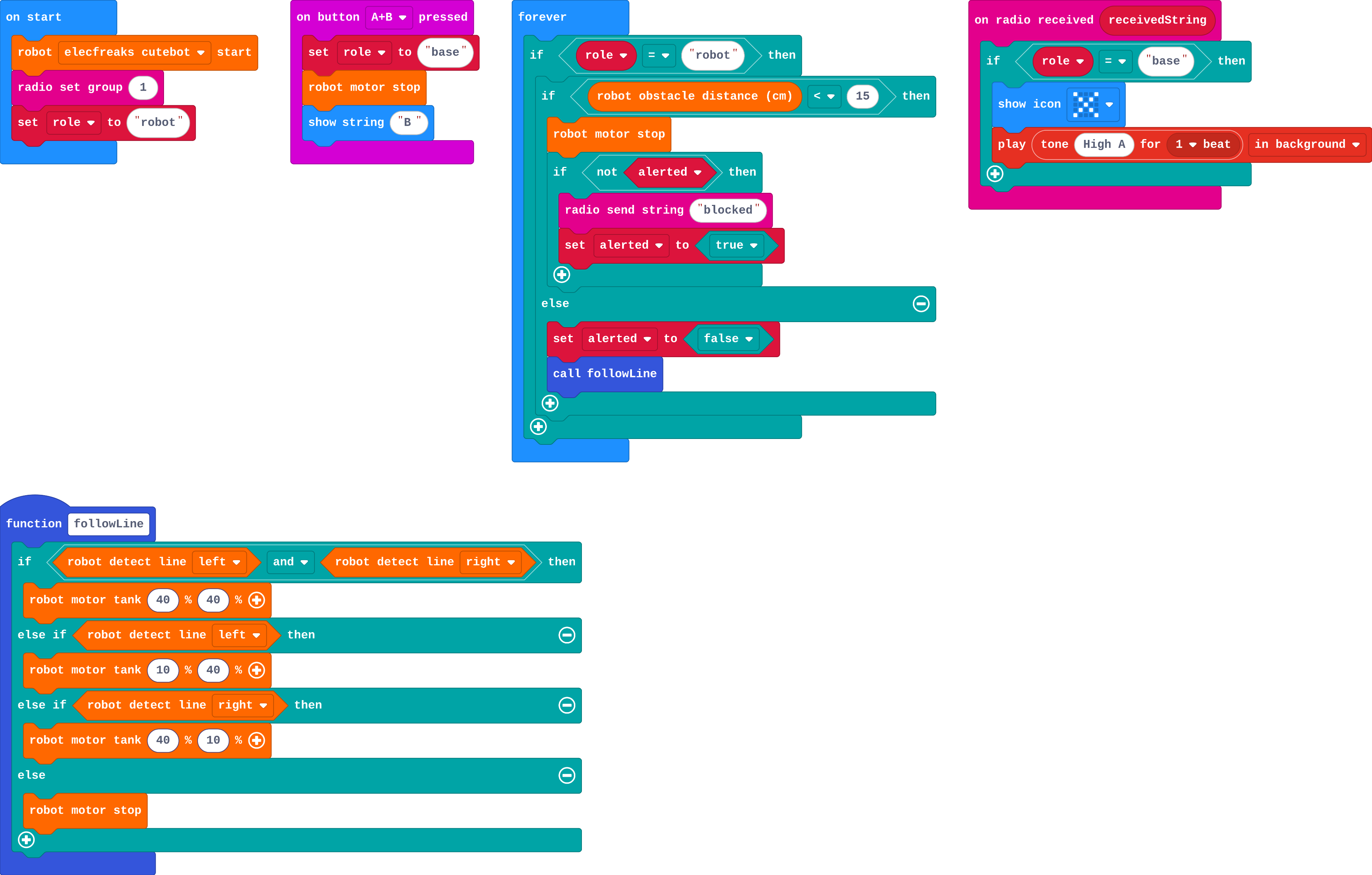
forever checks many times a second. Without alerted it would send the alert every time while the box is there; alerted remembers it has already sent, so it sends once.

The robot reports back by radio when something happens.

  • Send the alert once: a true/false variable remembers that it has already told.
  • It goes back to false when the way is clear, ready for next time.
  • A role variable lets one program be the robot or the base.
The program as blocks
Show as code
function followLine () {
    if (robot.detectLine(RobotLineDetector.Left) && robot.detectLine(RobotLineDetector.Right)) {
        robot.motorTank(40, 40)
    } else if (robot.detectLine(RobotLineDetector.Left)) {
        robot.motorTank(10, 40)
    } else if (robot.detectLine(RobotLineDetector.Right)) {
        robot.motorTank(40, 10)
    } else {
        robot.motorStop()
    }
}
input.onButtonPressed(Button.AB, function () {
    role = "base"
    robot.motorStop()
    basic.showString("B")
})
radio.onReceivedString(function (receivedString) {
    if (role == "base") {
        basic.showIcon(IconNames.No)
        music.play(music.tonePlayable(880, music.beat(BeatFraction.Whole)), music.PlaybackMode.InBackground)
    }
})
let alerted = false
let role = ""
robot.elecfreaksCuteBot.start()
radio.setGroup(1)
role = "robot"
basic.forever(function () {
    if (role == "robot") {
        if (robot.obstacleDistance() < 15) {
            robot.motorStop()
            if (!(alerted)) {
                radio.sendString("blocked")
                alerted = true
            }
        } else {
            alerted = false
            followLine()
        }
    }
})
The example, as blocks
Open the lesson →

Final challenge: Showcase and Patrol

10. Showcase

Try firstIn your show, what is a cue, and where does the robot decide what a cue means?

Check your answer

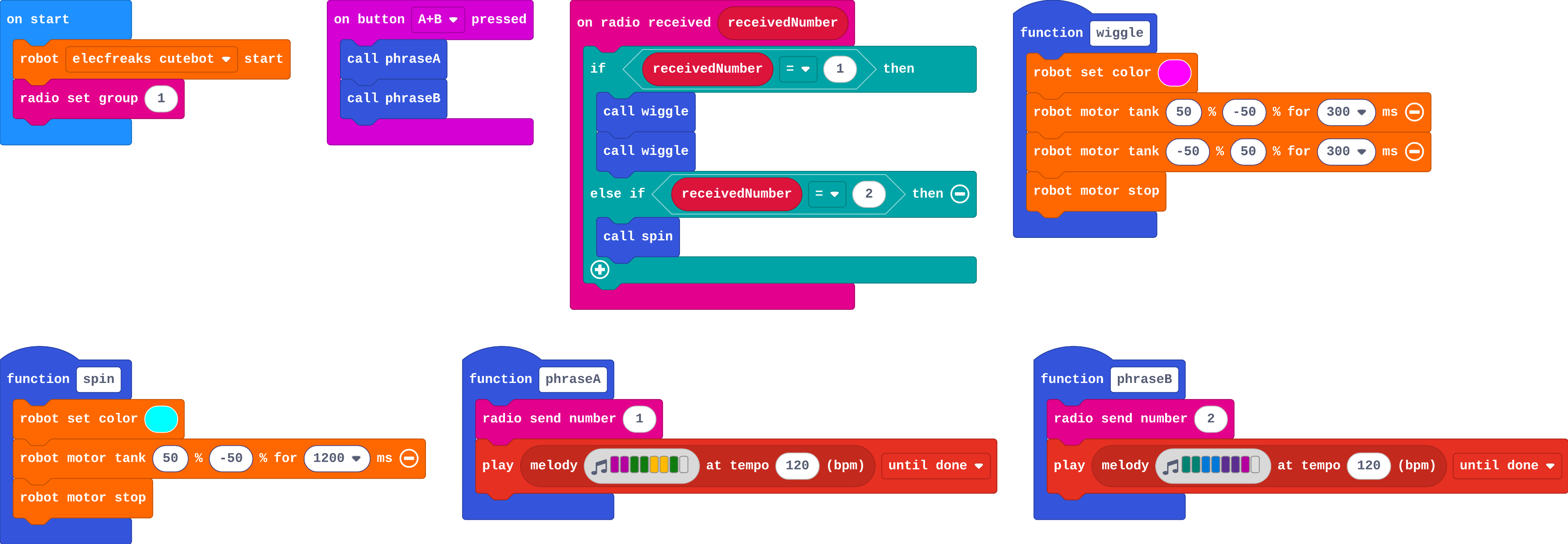
A cue is the number a phrase sends by radio as it starts. The dancer decides what it means in on radio received, by choosing a move for each number.

A show has three layers:

  • Moves: functions, each with its own lights, ending with a stop.
  • Cues: each phrase sends its number, then plays until done.
  • Choice: the dancer picks a move for each cue.

A safety stop is one more cue that every dancer obeys.

The program as blocks
Show as code
function wiggle () {
    robot.setColor(0xff00ff)
    robot.motorTank(50, -50, 300)
    robot.motorTank(-50, 50, 300)
    robot.motorStop()
}
function spin () {
    robot.setColor(0x00ffff)
    robot.motorTank(50, -50, 1200)
    robot.motorStop()
}
function phraseA () {
    radio.sendNumber(1)
    music.play(music.stringPlayable("C C G G A A G - ", 120), music.PlaybackMode.UntilDone)
}
function phraseB () {
    radio.sendNumber(2)
    music.play(music.stringPlayable("F F E E D D C - ", 120), music.PlaybackMode.UntilDone)
}
input.onButtonPressed(Button.AB, function () {
    phraseA()
    phraseB()
})
radio.onReceivedNumber(function (receivedNumber) {
    if (receivedNumber == 1) {
        wiggle()
        wiggle()
    } else if (receivedNumber == 2) {
        spin()
    }
})
robot.elecfreaksCuteBot.start()
radio.setGroup(1)
The example, as blocks
Open the lesson →

11. Patrol and alert

Try firstWhy does the robot's radio handler set the mode instead of driving the motors?

Check your answer

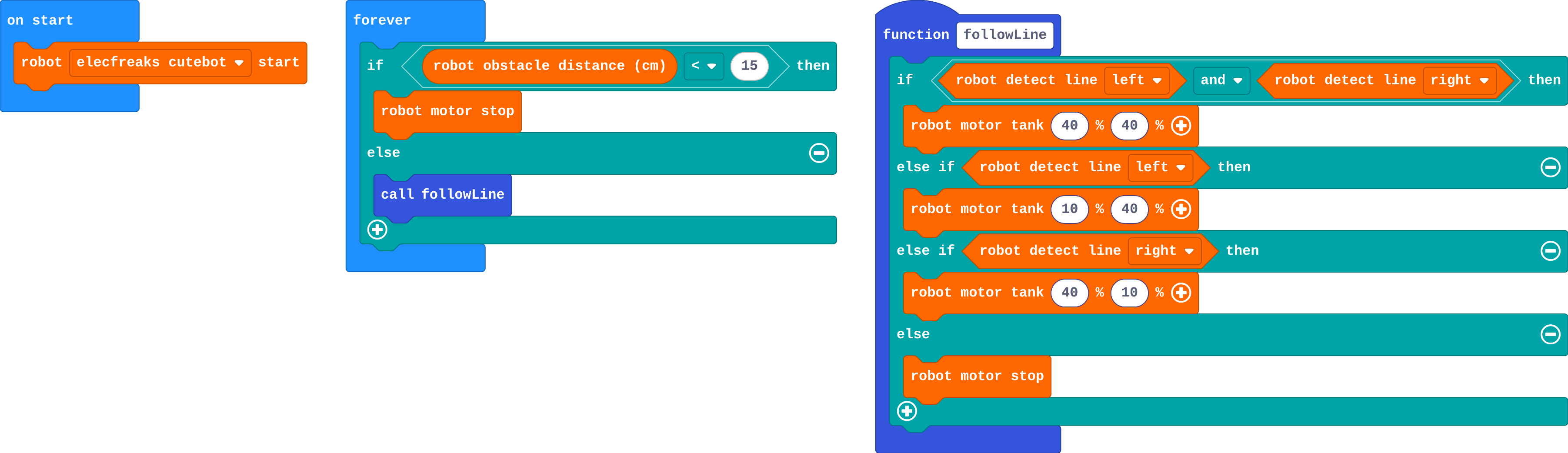
A handler runs once per message, and forever keeps driving the motors. Setting the mode lets forever do the job again and again until the mode changes.

A patrol system has two sides that talk both ways.

  • The base sends commands ("go", "stop").
  • The robot sets its mode from the command; forever does the job.
  • The robot reports problems once ("blocked", then "clear").
The program as blocks
Show as code
function followLine () {
    if (robot.detectLine(RobotLineDetector.Left) && robot.detectLine(RobotLineDetector.Right)) {
        robot.motorTank(40, 40)
    } else if (robot.detectLine(RobotLineDetector.Left)) {
        robot.motorTank(10, 40)
    } else if (robot.detectLine(RobotLineDetector.Right)) {
        robot.motorTank(40, 10)
    } else {
        robot.motorStop()
    }
}
robot.elecfreaksCuteBot.start()
basic.forever(function () {
    if (robot.obstacleDistance() < 15) {
        robot.motorStop()
    } else {
        followLine()
    }
})
The example, as blocks
Open the lesson →